

November, budget round. Management wants to know which webinars will run in 2027 and what they should deliver. You have a list of topic ideas, but no webinar program 2027 yet.
You need a framework that brings goals, formats, dates and responsibilities together. With MEETYOO Show you can put it into practice right away: with Pseudo-Live, UTM campaign tracking and analytics per person.
With the Excel template you can download, you have an editorial calendar for 2027 in 60 minutes.
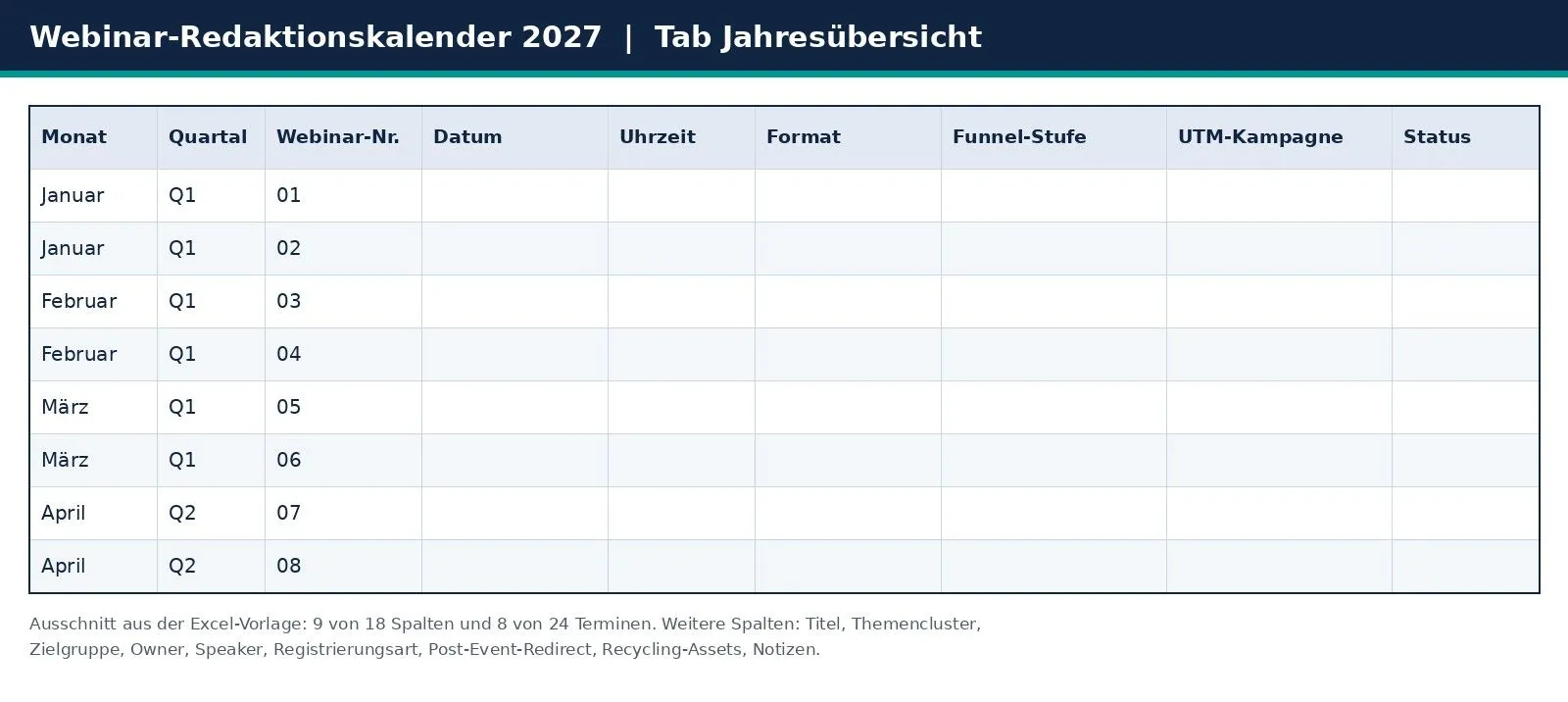
Download: Webinar editorial calendar 2027 as Excel template (XLSX) with the tabs annual overview, topic backlog, checklist per webinar and how to use.
Why a webinar program 2027 beats one-off webinars
One-off webinars often start from the moment: a product update is due, a speaker has time. Every event starts from zero, and the learnings get lost.
A program connects the dates. Topics can build on each other, attendees have a reason to come back, and every recording feeds the next piece of content.
| Criterion | One-off webinars | Webinar program |
|---|---|---|
| Topic choice | Ad hoc, based on availability | Clusters built on your audience's questions |
| Effort | New setup every time | Reusable checklist and template |
| Measurement | Single numbers, hard to compare | Same KPIs per funnel stage |
| After the event | The recording sits in the archive | Repurposing assets are planned |
Minutes 0 to 10: set your goals
Write down two or three annual goals your webinar program should support. For example: new leads in a target segment, more pipeline from existing contacts or better customer onboarding.
Assign each future webinar exactly one funnel stage: awareness, lead generation, nurture, pipeline or customers. Set one KPI per stage, such as registrations, live attendance rate or demo requests.
The webinar benchmarks 2026 show you which values are realistic.
Minutes 10 to 25: build topic clusters for your webinar program
Spread your 24 dates across three to five topic clusters. Each cluster answers a recurring question from your audience.
Good sources for the topic backlog:
- questions from sales conversations and support tickets
- the Q&A from your past webinars: Smart Q&A labels automatically tag incoming questions with labels such as Priority, Technical, Feedback or Logistics, and you'll find attendance and interaction data per person in Webcast Analytics
- search queries you already have content for
Enter each idea in the topic backlog tab and give it a priority from 1 to 3. Move the best ideas into the annual overview.
Minutes 25 to 35: choose webinar formats
Every topic gets the format that fits its goal and effort.
| Format | When it fits | What MEETYOO Show offers |
|---|---|---|
| Live | Product launches, expert Q&A, current topics | Engagement toolkit with surveys, polls, Q&A and public chat |
| Pseudo-Live | Evergreen topics, sales webinars, campaigns without a studio team | The recording starts at the scheduled time for everyone at once, with a countdown |
| Live + on demand | Topics with long-lasting demand | AI chapters and transcripts make the recording searchable |
| Panel or interview | Customer voices, partners, industry topics | Full CI customization, lower thirds for panelists, Q&A for questions to the panel |
Tip: Plan at least one Pseudo-Live webinar with an evergreen topic per quarter. That keeps your frequency steady even when speakers drop out at short notice.
Minutes 35 to 45: set webinar dates and frequency
Choose a rhythm your team can sustain for a year, for example one or two webinars per month. A fixed weekday and time make your program recognizable. The webinar benchmarks 2026 show which days and times perform well in the studies.
Enter the dates in the annual overview. Factor in holidays, trade fairs and quarter ends, and keep one buffer slot free per quarter.
Connect related dates into an event series: attendees see at a glance what is live, what is coming up and what has already happened, and RSVP per session. After the program, the series stays available as a media library. Event series are included in every plan, even the Forever Free Plan. The article Event series in the Content Hub shows how it works.
Minutes 45 to 50: assign roles
Clear responsibilities keep your webinar program running. Assign them before the first date is set.
| Role | Task |
|---|---|
| Program owner | Calendar, goals, reporting |
| Webinar owner | Setup, registration, checklist per session |
| Speakers and host | Content, slides, Q&A |
| Promotion | Campaign links, invitations, reminder emails |
| Sales | Follow-up with prioritized leads |
For promotion, see the article Webcast email templates and timeline.
Tip: Enter the UTM campaign and redirect target in the annual overview as soon as the date is set. Then your tracking is ready before the invitation goes out.
Minutes 50 to 60: plan tracking and repurposing
Decide now, for every webinar, how you will measure it and what happens to the content afterwards. The table shows which MEETYOO Show function belongs to which column of the template.
| Function in MEETYOO Show | What you define | Column in the template |
|---|---|---|
| Flexible registration | Quick login with name, long form with custom fields, HubSpot form, or webhook and SSO | Registration type |
| Campaign parameters in the profile | One UTM link per channel, the values land in the attendee profile. Guide: Track webinar campaigns | UTM campaign |
| Post-event redirect | Target URL for a demo, offer or thank-you page at the end of the session | Post-event redirect (target URL) |
| Analytics and CSV export | Live and on-demand attendance plus interaction per person, exported for your CRM and lead scoring | Checklist tab, task "Analytics exported as CSV" |
| Event Guru | The AI agent cuts video highlights and writes follow-up emails. AI chapters, summaries and transcripts provide material for recaps, newsletters and blog posts. | Repurposing assets |
With Chat with Webcast, on-demand viewers ask the recording directly. Why repurposing pays off: After the webinar ends: why your recording is your most wasted asset.
Three scenarios for your webinar program
Here is how the setup can look in your industry. The examples are planning suggestions you adapt to your goals.
| Industry | Program focus | Rhythm idea | What matters |
|---|---|---|---|
| Financial services | Investor and client formats, expert webinars in between | One fixed date per quarter, one expert format per month | Stable operation, archiving, ISO 27001, GDPR, EU servers |
| Pharma and healthcare | Mandatory training and expert webinars | Training quarterly, expert webinars as needed | Data protection, proof of attendance via analytics |
| Tech and SaaS | Product launches, demos, customer webinars | Two dates per month, evergreen via Pseudo-Live | UTM tracking, redirect to demo booking, lead scoring |
Which platform carries your webinar program?
Meeting tools are built for daily work. A program needs branding, registration with tracking, interaction and an archive you can reuse. MEETYOO Show is built for high-stakes moments: CEO townhalls, investor relations, product launches. Companies such as Commerzbank, Mercedes-Benz, Allianz Global Investors, Merck and Siemens use it.
| What your program needs | What MEETYOO Show delivers |
|---|---|
| An appearance in your corporate design | Full CI customization with overlays and lower thirds, see Branding |
| Active attendees | Dynamic Q&A, live polls and moderated chat, see Engagement |
| More value from every recording | AI chapters, summaries and searchable content, see AI features |
| Related dates as one program | Event series: one access for all sessions, RSVP per date and AI search across all videos in the series (requires transcripts and activated chat) |
| Data protection and compliance | ISO 27001, GDPR-compliant, EU servers, made in Germany |
| Help during the event | Self-service with Service on Demand: optional expert-managed service from Starter, full service on Enterprise |
Conclusion: your 2027 webinar program is set
In 60 minutes you have goals, topic clusters, formats, dates, roles and a repurposing plan. The template keeps everything in one place, and the checklist per webinar makes sure no session runs without tracking and follow-up. Download the Excel template and enter your first dates.
Start with the Forever Free Plan: permanently free, no expiry date, no credit card required. You'll find all plans under plans and pricing.
See how Pseudo-Live, campaign parameters, post-event redirect and analytics work together in your program on the Marketing & ROI page. You can also request a conversation about your webinar program there.
FAQ
How many webinars should I plan for 2027?
As many as your team can reliably prepare, promote and follow up. A fixed rhythm makes your program predictable and recognizable. Pseudo-Live helps you keep the frequency without extra live production.
What belongs in a webinar editorial calendar (Excel template)?
For each session at least the date, topic, topic cluster, format, audience, funnel goal, owner, registration type, UTM campaign, redirect target and planned repurposing assets. The Excel template for download already contains these columns.
How do I measure the success of my webinar program?
Set one KPI per webinar that matches its funnel stage. Campaign parameters show where attendees come from. Analytics shows attendance and interaction per person, and the post-event redirect leads to your conversion page. You'll find formulas in the article Webinar ROI: the KPIs that actually matter.
What should I do with the recordings?
Plan them as on-demand content. With Event Guru you create highlights and follow-up emails, and AI chapters make long recordings searchable.
Which format works for evergreen topics?
Pseudo-Live. You upload a recording and set the start time. Attendees see a countdown, then the video starts for everyone at once. You decide when the recording becomes available on demand.
Can I start my webinar program for free?
Yes, with the Forever Free Plan: permanently free, no expiry date, no credit card required. It includes up to 500 registrations per event, 2 hours of live streaming per month, 10 hours of on-demand content, all engagement tools, event series, basic analytics and AI features with usage limits. Theming runs with the MEETYOO logo. Two one-hour live webinars per month fit into the 2 live hours.
Which plan fits a larger webinar program?
Starter costs €240 per month, billed annually. It includes up to 1,000 registrations per event, up to 10 hours of live streaming per month, up to 50 hours of on-demand content, comprehensive analytics, full branding capabilities and optionally an expert-managed service. Enterprise offers unlimited registrations, optional SSO, the full expert-managed service and a dedicated account manager.


