
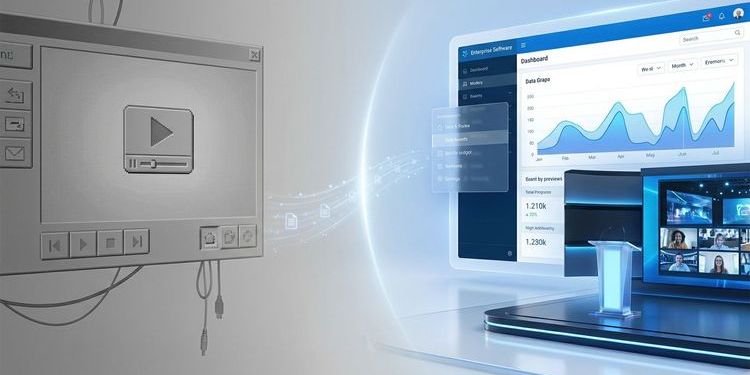
GoToWebinar has long been the default choice. On the market since 2006, deeply embedded in mid-market organisations, familiar in its operation. Over the past two years, however, the signals have been mounting that this familiarity comes at a price: price increases without new features, persistent GDPR ambiguity for EU companies, and a platform that looks increasingly dated against what modern webcast tools can do.
If you actively use GoToWebinar and are honestly evaluating whether a switch is worth the effort, this article gives you an analysis of its limitations, a direct product comparison, and a practical migration path. Evaluating a GoToWebinar alternative doesn't mean rebuilding everything from scratch — it means identifying where your current solution is generating real costs.
What GoToWebinar delivered – and why it worked for so long
GoToWebinar helped shape the market for online events in Europe. Its strengths are real.
Reliability: The technology is stable. Nearly 20 years of operation have hardened the infrastructure. A GoToWebinar event rarely fails for technical reasons.
Registration workflows: The invitation and sign-up system is one of the most mature on the market. Automated email sequences, customised registration pages, and straightforward follow-up communication all work without friction.
Familiarity: For teams without a dedicated webcast expert, GoToWebinar was long the pragmatic choice: easy to learn, sufficient for internal training and straightforward marketing webinars.
For exactly these scenarios, GoToWebinar remains a solid solution. If you've grown beyond that scope, read on for the key differences.
The four limits where GoToWebinar falls short today
1. GDPR: the structural residual risk is growing
GoToWebinar belongs to the GoTo Group (formerly LogMeIn), which has been owned by Francisco Partners and Evergreen Coast Capital since 2020 — both US companies. This triggers the US CLOUD Act: it legally obligates US companies to disclose data upon government request, regardless of where that data is physically stored.
Even if GoToWebinar uses EU servers, disclosure to US authorities can be legally compelled. The EU-US Data Privacy Framework currently provides a legal basis for data transfers. The EU General Court upheld it in a first-instance ruling on 3 September 2025 — but the decision is not yet final and remains subject to review by the Court of Justice of the EU. NOYB has already announced a challenge. This is the third such framework after Safe Harbor (CJEU 2015) and Privacy Shield (CJEU 2020).
Legal context: Attendance timestamps, viewer IP addresses, and engagement data are personal data under GDPR. For banks, pharmaceutical companies, insurers, and public authorities across the DACH region, this is a documentable compliance point that regularly surfaces in data protection audits.
→ The GDPR trap: why your choice of webinar tool determines your data protection
2. Branding: GoToWebinar is always visible
GoToWebinar allows logo placement, accent colours, and customised registration pages. If you need full CI control over the live stream — professional lower thirds, custom virtual backgrounds, overlays, a stage that looks like your company — you hit a hard limit.
When you stream a product launch to 500 customers, the difference is immediately obvious: the GoToWebinar stage signals "we have a webinar tool." That's not independent brand staging.
3. Missing content ROI after the event
GoToWebinar delivers a recording after the event. What happens next is down to your team: create a transcript, set chapter markers, cut highlight clips, prepare follow-up content. For a single 60-minute event, that's a realistic workload of six to twelve hours.
Modern webcast platforms automate this. Transcripts, chapter markers, and a searchable on-demand archive are generated automatically from the live event. Viewers can ask the video questions weeks later and receive a timestamped link.
The numbers: 12 webcasts per year, 8 hours of post-production per event, internal rate of €50/hour. That's €4,800 in personnel costs per year that appear on no platform pricing page. The full cost calculation:
4. Q&A management at scale
GoToWebinar offers Q&A with upvoting. For events up to 100 attendees, that's adequate. Once 200 questions come in within 20 minutes, the limitations show: no automatic categorisation, no speaker assignment, no role separation between multiple moderators. The moderation team fights the interface instead of the content, and relevant questions get lost.
GoToWebinar vs. MEETYOO Show: direct comparison
| Requirement | GoToWebinar | MEETYOO Show |
|---|---|---|
| CI branding on the live stream | ⚠️ Basic only | ✅ Fully native |
| GDPR by design / Germany servers | ❌ US company | ✅ ISO 27001:2022, EU servers |
| Failover / backup stream | ❌ | ✅ Redundant encoders |
| Automatic transcript + chapter markers | ❌ | ✅ AI-powered, automatic |
| Searchable on-demand archive | ❌ | ✅ |
| Chat with the recording | ❌ | ✅ |
| AI Q&A labelling & speaker assignment | ❌ | ✅ |
| Multi-tenancy | ❌ | ✅ |
| Transparent pricing | ✅ | ✅ |
| Free entry point | ✅ 7 days | ✅ Forever Free Plan |
| German-language support | ⚠️ Limited | ✅ |
| Service on demand (production team) | ❌ | ✅ |
| Registration workflows | ✅ Mature | ✅ |
Tip: If you're evaluating several platforms side by side, the comprehensive market overview with 10 providers, GDPR comparison table, and all pricing tiers is worth reading:
Testing a GoToWebinar alternative: what the Forever Free Plan includes
Create a free account now. Your first webcast can be up and running in under an hour.
What you get with the Forever Free Plan:
- Theming features for your event design (with MEETYOO logo)
- All AI features (transcript, chapter markers, Chat with Webcast)
- Up to 500 registrations
- Permanently free — no expiry, no credit card required
Set up your next planned webcast on both platforms in parallel. GoToWebinar stays as a fallback until you're confident. The switch happens at your pace.
What MEETYOO Show does differently
Built from the ground up as a broadcast platform
GoToWebinar was built as an extension of a meeting architecture. MEETYOO Show wasn't. The platform has been designed for broadcasts from day one: with a focus on maximum stability, high bitrate, and professional production control without external encoder overhead.
Failover: what happens when the stream drops
GoToWebinar offers no host-side backup encoder. If the stream goes down, it stays down — until the team manually restores the connection, often 60 to 90 seconds of outage in front of 1,000 viewers.
MEETYOO Show uses redundant encoder setups as standard. Primary and backup run in parallel. If the main stream fails, the backup takes over without interruption — invisible to viewers, without manual intervention. For a CEO townhall with 800 employees or a product launch with 500 customers, that is the prerequisite for professional delivery. A stream outage during the CEO address is not an IT incident — it is a communications failure.
Full CI branding – native, no encoder required
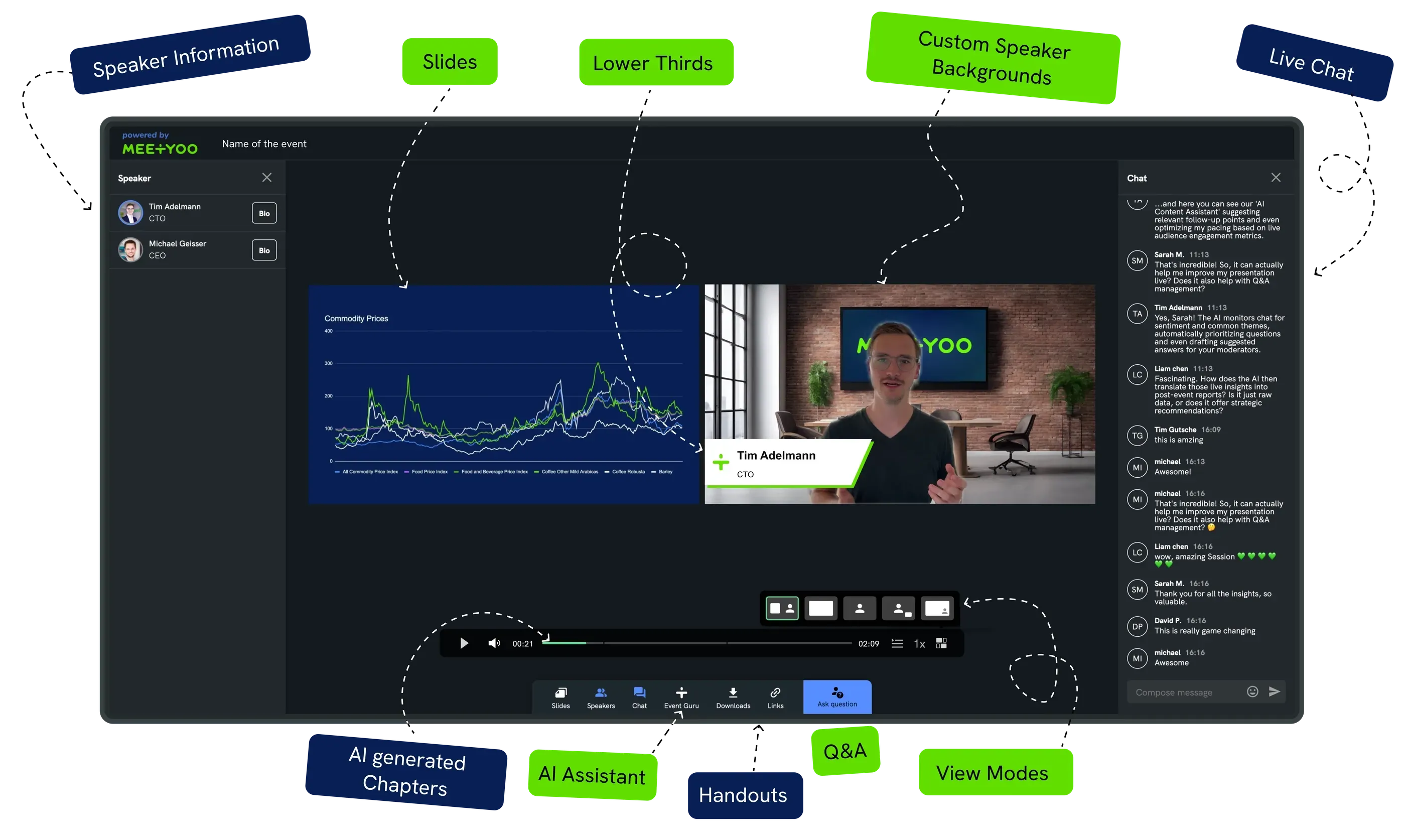
With MEETYOO Show, the platform disappears behind your brand. Native lower thirds, virtual studios, and full CI control are built in. No OBS, no Blackmagic, no external encoder needed. The AI Branding Builder generates a complete CI theme from your website URL in seconds.
→ Explore all branding features
AI features that keep working after the event
Within minutes of the event ending, your content is already prepared:
- Automatic chapter markers appear based on topics discussed
- Key-moment detection flags the most important passages in the stream
- Chat with Webcast lets viewers ask the video questions at any time, with a timestamped link to the right moment
- Smart Q&A labels automatically categorise incoming questions by topic
A single live event becomes a searchable on-demand archive — without anyone on your team investing time in it.
→ Explore all MEETYOO AI features
Enterprise security without extra work
ISO/IEC 27001:2022 certified (TÜV), servers in Germany, developed and operated in Germany. The US CLOUD Act does not apply. GDPR compliance is the starting point, not an add-on.
Reference customers include Commerzbank, Mercedes-Benz, Allianz GI, Merck, Siemens, SAP, and AutoScout24.
Moderated Q&A that scales
Incoming questions are automatically categorised by AI. Upvoting surfaces the most relevant ones. Questions can be assigned to individual speakers. Multiple moderators can work simultaneously with clear role separation. With 300 simultaneous questions, your team stays in control. The post-event analysis shows which topics genuinely engaged your audience.
→ Explore all engagement features
Service on demand: production team for the moments that matter
GoToWebinar is self-service — that's entirely appropriate for internal training and straightforward webinars. For the CEO townhall with 1,000 employees or the earnings call in front of institutional investors, a different logic applies: no margin for error, no room for improvisation.
MEETYOO Show offers Service on Demand — an option GoToWebinar simply does not have. For the events where you want to hand over responsibility, an experienced MEETYOO production team takes full ownership: setup, rehearsal, live operation, post-event asset delivery. You focus on content and audience.
That is why Commerzbank, Mercedes-Benz, and Allianz GI use MEETYOO: not only because the software is capable, but because the expert team behind the software delivers when it matters.
The five most common switching scenarios
Scenario 1: The product launch for an external audience
The company is planning a product launch with 500 customers and partners. Full CI branding is required: the stage needs to look like the company's own brand. GoToWebinar delivers a branded registration page. On the live stage, the platform look remains dominant.
What MEETYOO solves: Full branding control from the registration page to the on-demand archive.
Scenario 2: The CEO townhall with 1,000 employees
The stream has to hold. An outage during the CEO address damages the credibility of the event. GoToWebinar offers no produced failover stream.
What MEETYOO solves: Redundant encoder setups. If the primary stream fails, the backup takes over. 1,000 viewers notice nothing.
Tip: How to turn your all-hands meeting into more than a one-time event:
→ One event, four weeks of content: how to turn your town hall into a real communications campaign
Scenario 3: Compliance training in a regulated industry
Pharma, financial services, public administration: here, the data protection question is a compliance requirement. Data storage exclusively in Germany must be documentable.
What MEETYOO solves: ISO 27001, GDPR, server location Germany. The legal basis is clear and audit-proof.
Scenario 4: The regular marketing webinar programme
12 to 24 webinars per year, each with post-production workload. Transcript, clips, follow-up content — for a small marketing team, these are hours that are missing elsewhere. GoToWebinar delivers the recording; everything else is manual.
What MEETYOO solves: AI automates transcription, chapter structure, and on-demand archiving. Per event, that's realistically 4–8 hours saved. Across an annual programme of 20 events, that's up to 160 hours.
Scenario 5: Investor relations communications
Earnings calls and investor updates require broadcast quality, complete archiving, and GDPR-compliant data processing. For listed companies, that's a regulatory requirement.
What MEETYOO solves: Stable infrastructure, full branding, ISO-certified data storage in Germany.
→ Investor Relations 2.0: how your earnings call becomes your most valuable content asset
What your webcast workflow looks like with MEETYOO Show
Most teams are fully productive after two to three test events. From there, a typical webcast month looks like this:
The week before the event: Your branding has been in place since the first event. You call up the CI theme, update the title and date. The registration page is updated in ten minutes. Invitation emails go out automatically.
On event day: MEETYOO Show is browser-based. Speakers join via link — no installation, no onboarding needed. You control scenes, overlays, and Q&A from a single interface.
30 minutes after the event ends: The transcript is ready. Chapter markers have been set automatically. The on-demand archive is live. Viewers who missed the event can access the recording immediately and ask questions directly.
In the following week: You share the archive link, use the AI-generated chapter markers for social media posts, and review in the analytics dashboard who attended, for how long, and which questions were asked most frequently.
From the second event onwards, this runs automatically. The first event is the only one where you genuinely need to set things up.
→ After the webinar: why your recording is your most underused content asset
What if the switch goes wrong?
MEETYOO Show runs in parallel with GoToWebinar. You can set up your next webcast on both platforms and decide yourself which one you use for the live event. Only once you're confident do you switch completely.
You have time to train your team, set up branding, and test a first real event under live conditions before cancelling your old platform.
The MEETYOO team is reachable in English and German. The Forever Free Plan is a permanent testing option under real conditions, with GoToWebinar as a fallback in hand.
Migration from GoToWebinar: how the transition works
Step 1 — Create an account: The Forever Free Plan includes all AI features, theming functions, and up to 500 registrations. Permanently free — no expiry, no credit card required.
Step 2 — Run in parallel: Use two to three smaller events under the free plan to get your team up to speed. MEETYOO Show is browser-based; speakers and attendees don't need to install anything.
Step 3 — Transfer registration data: Export existing contact lists from GoToWebinar. MEETYOO Show supports CSV import and common CRM integrations.
Step 4 — Set up branding: With the AI Branding Builder, setting up your first CI theme takes a few minutes. Enter your URL, generate the theme, adjust if needed.
Step 5 — First production event: Once your team and technology are familiar, move your first business-critical event to MEETYOO Show.
For IT teams: MEETYOO Show supports SSO with Azure AD via OpenID Connect (OIDC). Role-based access, protected event links, and access restrictions to defined user groups are all configurable.
→ Webcast SSO with Azure AD: access control for enterprise events
What doesn't need to change
GoToWebinar users value the mature registration workflows and automated email sequences. MEETYOO Show has a comparable feature set. If you already have a strong email marketing setup connected via HubSpot, Salesforce, or Marketo, it's worth reviewing the integration options before switching.
MEETYOO offers native integrations and an open API. For teams that want to retain existing CRM connections, that's the first conversation to have with the MEETYOO team.
Conclusion
GoToWebinar has years of merit. But if you regularly produce webcasts for external stakeholders, your current setup carries a hidden cost: GDPR risks your data protection officer already knows about. CI branding that stops at the live stage. And hours of manual post-production per event that add up.
MEETYOO Show is an enterprise webcast platform Made in Germany, built for exactly the formats where this matters: CEO townhalls, product launches, investor relations, compliance training. Technically reliable, visually at the level of your brand, legally sound without extra effort.
The Forever Free Plan is permanently free: all AI features, theming functions, and up to 500 registrations — no credit card, no expiry date.
FAQ
What is the best GoToWebinar alternative for DACH companies?
For enterprise webcasts with full CI branding, GDPR compliance, and AI features, MEETYOO Show is the leading alternative from Germany. ISO 27001:2022 certified, servers in Germany, transparent pricing from €240/month. For a comprehensive market overview with 10 providers:
→ The 10 best webinar platforms in 2026 compared
Is GoToWebinar GDPR-compliant?
GoToWebinar belongs to the GoTo Group (formerly LogMeIn) under US corporate ownership. The EU-US Data Privacy Framework currently provides a legal basis for data transfers — the EU General Court upheld it in a first-instance ruling on 3 September 2025, but a CJEU review is still pending. The US CLOUD Act continues to obligate US companies to disclose data upon government request, regardless of server location. For organisations with strict compliance requirements, a purely European solution remains the legally safer choice.
What does GoToWebinar cost — and what do you actually pay?
GoToWebinar currently lists several plans, including: Lite ($49/month billed annually, 250 attendees) and Standard ($99/month billed annually, 500 attendees). For higher plans, check current pricing directly with GoTo as these change regularly. Add GDPR compliance costs (legal counsel, DPA, standard contractual clauses: realistically €1,000–2,500/year) and internal post-event workload. The full TCO calculation:
→ Webinar platform costs 2026: what you actually pay
How long does migration from GoToWebinar to MEETYOO Show take?
For small to mid-sized teams: one to two weeks to the first production event. MEETYOO Show is browser-based — no installation required for speakers or attendees. The AI Branding Builder sets up the first CI theme in minutes. GoToWebinar remains available as a fallback until the very end.
Can I migrate GoToWebinar contact lists to MEETYOO?
Yes. MEETYOO Show supports CSV import and common CRM integrations (HubSpot, Salesforce, and others). Existing registration data can be exported and transferred to the new platform.
How does MEETYOO Show differ from Zoom and Teams as a GoToWebinar replacement?
Zoom Webinars and Teams Town Hall are meeting tools with a webinar add-on. With both, the platform aesthetic remains visible on the live stream, and professional failover requires external encoder setups. MEETYOO Show was built as a broadcast platform: full branding natively integrated, redundant encoders without technical overhead, GDPR-compliant without US corporate ownership. The differences in detail:
→ Zoom alternative for webinars: GDPR-compliant & enterprise-grade → Microsoft Teams for events: Town Hall limitations explained
Is there a free entry point for MEETYOO Show?
Yes. The Forever Free Plan is permanently free — no expiry date, no credit card required. It includes all AI features, theming functions, and up to 500 registrations.


