
Weeks of preparation. The webcast ran well. The chat was active, the Q&A session ran over time. And then?
Most teams send a generic thank-you email to everyone, attendees and no-shows alike, and wait. The result: a large share of webinar leads are never properly qualified, even though webcasts rank among the highest-converting B2B lead generation channels. Current data shows 73% of B2B marketers and sales leaders say webinars are their best channel for high-quality leads.
The problem lies in what happens after the event. Or more often: what doesn't happen.
This playbook shows how to turn your webinar follow-up into a systematic lead nurturing machine: with email templates, a segmentation framework, and the analytics data MEETYOO Show delivers immediately after your event.
Why most webinar follow-ups fail
The most common mistake is as simple as it is costly: one message for everyone.
An attendee who spent 45 minutes asking sharp questions is at a completely different point in their buying decision than someone who registered but never logged in. Putting both into the same sequence causes real damage: the high-intent lead feels unseen. The no-show gets no reason to watch the recording.
Then there's the timing issue. According to MarketingProfs, the first follow-up email should arrive within two hours of the event ending. Not the next day. Within two hours, while the event is still fresh.
And finally: missing CRM connection. When engagement data from the webcast (watch time, questions asked, poll answers) never makes it into your sales process, the team prioritises blind. Yet these signals are exactly what show who's ready to buy.
Step 1: Segmentation with MEETYOO Analytics
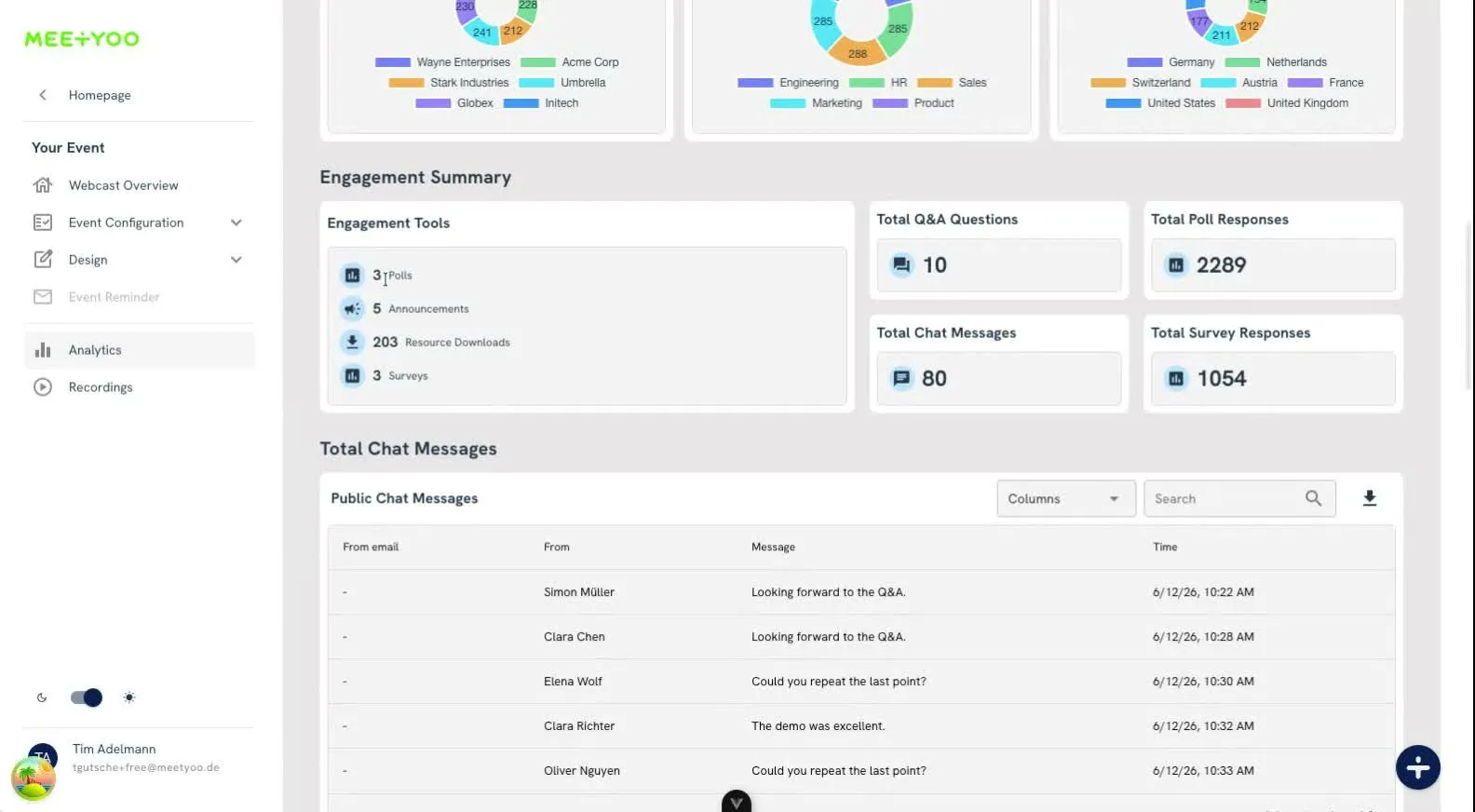
Before you write a single follow-up email, segment by behavioural data. MEETYOO Show delivers everything you need in one report: watch time per person, attendance status (Live, On-demand, Both, No View), questions submitted with upvotes, poll answers and downloads. All searchable, sortable and fully exportable with email addresses.
The analytics dashboard is available immediately after the event. No waiting for an export.
The four segments to work with:
Segment A: Highly engaged Watch time over 30 minutes, questions asked, polls completed, handouts downloaded. These are your hottest leads. Anyone appearing under "Live Viewers" in the analytics dashboard with multiple interactions has clearly signalled: I want to know more.
Segment B: Passively present Watch time 10–30 minutes, no active interaction. Interest exists but hasn't been expressed yet. Nurturing candidates.
Segment C: Briefly present (under 10 minutes) Technical issues, wrong event, or no genuine interest. Low follow-up effort justified.
Segment D: No-shows The MEETYOO Analytics report flags this group as "No View": registered but never logged in. This doesn't necessarily mean disinterest; often it's simply a scheduling conflict. A friendly recording email reactivates many.
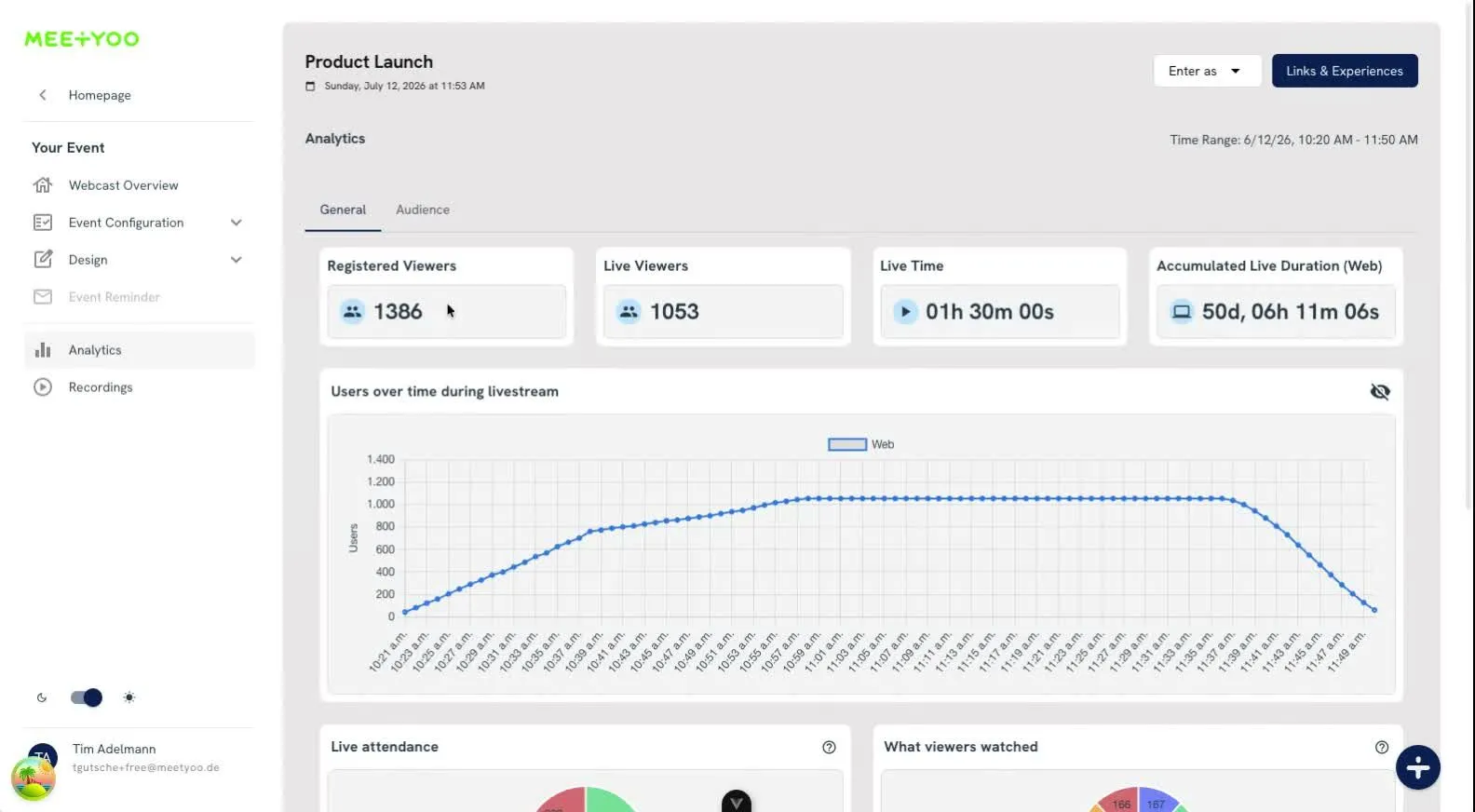
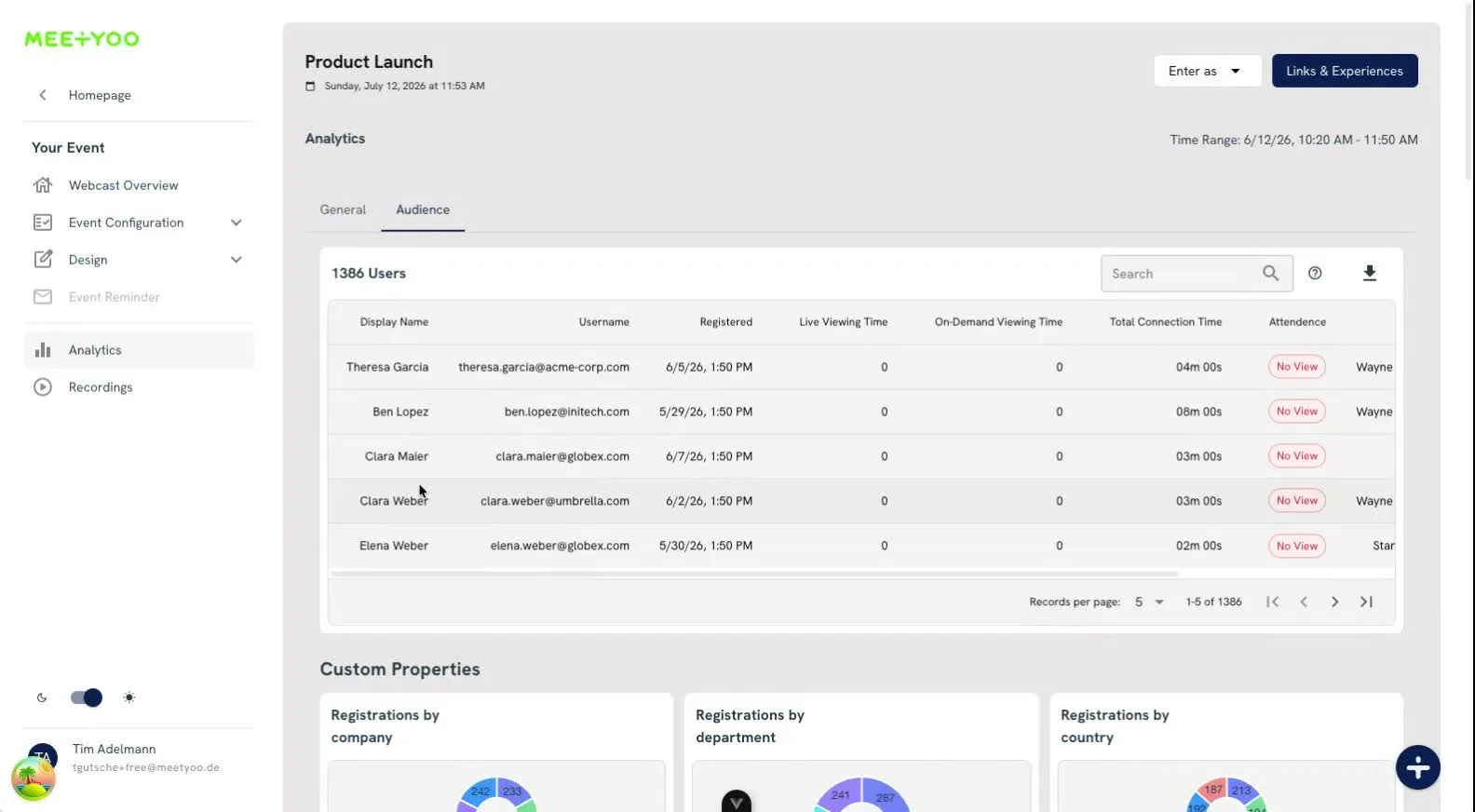
How to segment in MEETYOO Show: Open the Audience tab in the analytics dashboard after the event. You see each registered person's attendance status, exact watch time and all interactions. Export the list as CSV. That's your segmentation base ready to go. → MEETYOO Analytics in detail
Step 2: The follow-up timeline
An effective post-webcast cadence runs over 7–10 days. Three phases, two audiences.
Phase 1: Within two hours of the event
To Segments A and B:
- Link to the recording, specifically with a timestamp deep-link to the relevant moments. MEETYOO automatically generates chapters after the event, so you can link directly to the section most relevant to each recipient.
- Three concrete takeaways from the event, not a generic summary.
- One single CTA: book a demo, download a guide, or register for the next session. Matched to where the lead sits in the funnel.
To Segment D:
- A friendly "we missed you" message with three concrete highlights from the event.
- Link to the recording, ideally with a timestamp pointing to the moment that generated the most questions.
- Low-friction CTA: "Check it out when you have 20 minutes."
MEETYOO advantage here: The recording is available immediately after the event, including AI-generated chapters with descriptive titles. These chapters appear on the video timeline and as a navigation panel. You can link directly to the section most relevant to each recipient, which demonstrably increases click rates on follow-up emails. → AI features in detail
Phase 2: Days 2 to 3 – value, not summaries
Now it's about keeping the momentum alive, with concrete value that directly extends the webcast content.
For Segment A: An explicit offer of a 1:1 conversation or demo. With context: "You asked how this works for YOUR-USE-CASE. We'd love to show you live."
For Segment B: A specific guide or resource that addresses the natural next step, not the same thing as in the first email.
Open Q&A questions deserve special attention: MEETYOO exports all Q&A entries with timestamp, status and upvote count. If someone asked a question during the live session that didn't receive a full answer, a personal reply by email is a powerful conversion moment. Someone asking "Do you meet ISO-27001 and what does the API look like?" is actively evaluating feasibility. That's a hot lead, not a nurturing candidate.
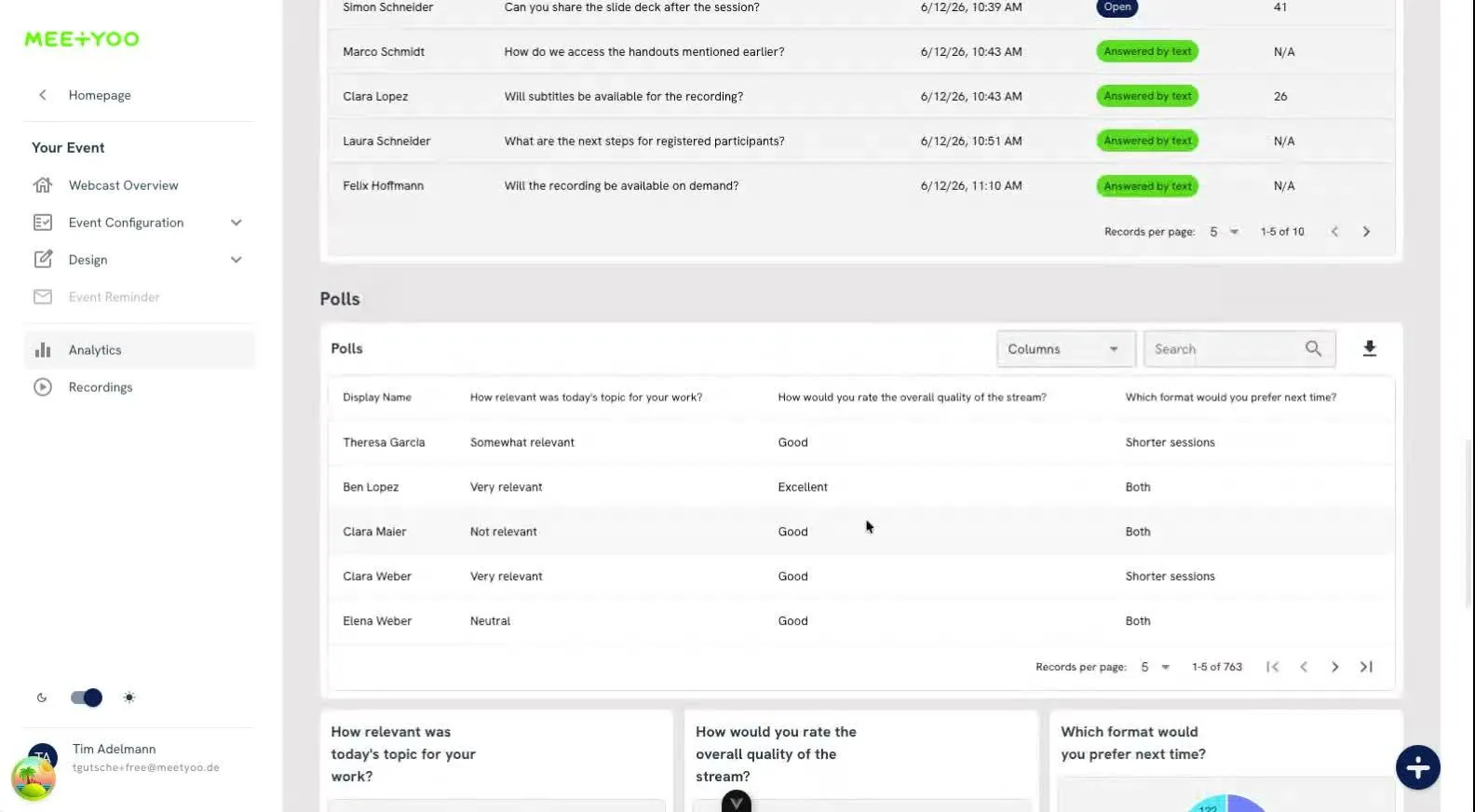
Tip: MEETYOO's AI labelling automatically categorises Q&A questions by topic and priority. After the event you can filter with one click: "Show me all questions for sales." No more manual sorting. → How to use Q&A data strategically
Phase 3: Days 5 to 7 – final touchpoints
For Segment B: Another asset (case study, checklist, report) with a CTA designed to surface buying intent, for example: "Want to see what this looks like for a company like yours?"
For Segment D: If the replay still hasn't been watched, one final nudge. After that: move into your general nurture flow.
Email templates: what this looks like in practice
The templates use UPPERCASE as placeholders. Replace them with the relevant content before sending.
Template 1: Immediate follow-up for active attendees (Segment A)
Subject: FIRST-NAME, your recording is here – question answered too
Hi FIRST-NAME,
thanks for joining today, especially for your question about TOPIC. I did a bit more research: ANSWER.
The recording is here: RECORDING-LINK. I've linked directly to the section most relevant to you: TIMESTAMP-LINK.
If you'd like to see how this works for YOUR-USE-CASE, I'd love 20 minutes with you: DEMO-LINK
Talk soon, YOUR-NAME
Template 2: No-show email (Segment D)
Subject: FIRST-NAME, you missed it – here's the short version
Hi FIRST-NAME,
you registered but couldn't make it. No problem.
What was covered today (in 3 points):
- KEY INSIGHT 1
- KEY INSIGHT 2
- KEY INSIGHT 3
The full recording (45 min.) is here: RECORDING-LINK. If you only have 10 minutes, start at TIMESTAMP – that's the section that generated the most questions.
YOUR-NAME
Template 3: Value email for passive attendees (Day 2–3)
Subject: The guide we briefly mentioned in the webcast
Hi FIRST-NAME,
we mentioned RESOURCE but didn't share the link. Here it is: RESOURCE-LINK.
WHY THIS IS RELEVANT FOR YOUR CONTEXT.
Happy to answer any questions.
YOUR-NAME
Step 3: Lead scoring – who's actually ready to buy?
Not every interaction carries the same weight. A scoring model built on MEETYOO analytics data:
| Signal | Points (example) |
|---|---|
| Attended live (over 30 min.) | +15 |
| Question submitted | +10 |
| Poll completed | +8 |
| Handout downloaded | +7 |
| Recording watched on-demand | +10 |
| Replay over 50% completed | +12 |
| Demo link clicked | +20 |
| No-show | -5 |
The point values are examples. Calibrate them to your ICP and sales cycle. The principle stays the same: anyone showing multiple engagement signals in MEETYOO who fits your ICP (company size, industry, function) gets handed to sales. Everyone else goes through nurturing.
Best practice: Always hand leads to sales with a context brief: "This person asked about ISO-27001 and API integration during the webcast and watched the recording up to minute 38." That's the difference between a cold call and a warm first conversation.
Step 4: The recording as a permanent lead generator
The follow-up doesn't end after 7 days. Your webcast recording is a gated content asset that continuously generates new leads.
MEETYOO provides the foundations: the recording is available on-demand immediately after the event, the AI key-moments detection automatically flags the most important points on the timeline, and the "Chat with Webcast" feature lets on-demand viewers ask questions and jump directly to the right moment.
Three concrete uses:
Gated landing page: Put the recording behind a registration form. Every new on-demand viewer is a new lead. MEETYOO tracks on-demand views in the Audience tab. You know who watched the recording, when, and for how long.
Blog post from the transcript: The AI automatically generates transcripts. Use them as raw material for SEO-optimised articles that drive permanent traffic to the recording.
LinkedIn clips from key moments: The key-moments detection shows you which points in the event had the highest engagement spikes. Those are your clip candidates.
The MEETYOO AI Event Assistant can help with all of this: it cuts video highlights, drafts follow-up emails and generates summaries directly from the recording.
→ All AI features → How AI maximises your webcast ROI
Common mistakes
Waiting until CRM sync and lead scoring are complete. Send the first email within two hours, even semi-manually. Precision on scoring matters less than speed on the first touch.
Sending the recording to everyone at the same time. This strips the signal "you were actively engaged" of all meaning. Segment, even if it's just two groups to start: attendees and no-shows.
Ignoring Q&A data. Your audience's questions directly reveal who is ready to buy, which content gaps exist in your communication, and what should be covered in the next session. MEETYOO exports all questions with upvote count and status. Not reviewing this list means throwing away the most valuable part of the event.
Not tracking on-demand viewers. On-demand viewers often convert better than live attendees: they actively choose to watch the recording, usually out of genuine interest. In the MEETYOO Audience tab you can see exactly who watched on-demand, and trigger follow-up flows for this group too.
Use cases
Marketing manager at a SaaS company Runs monthly demand generation webinars. Opens the MEETYOO Audience tab after the event, exports the list of live viewers with over 30 minutes watch time and filters by submitted questions. This group goes directly into the SDR queue; everyone else goes into a HubSpot nurture flow. Sales only speaks with pre-qualified contacts.
Event manager at a mid-market company Runs quarterly customer webcasts. Uses MEETYOO's AI labelling to filter the most relevant questions per category (Sales, Technical, HR) after the event. The most common questions become a follow-up article on the website and an updated FAQ page: content that keeps generating leads.
Internal comms manager Organises all-hands meetings for several hundred employees. Uses the Audience tab to see which teams watched the recording and which didn't. Instead of treating everyone the same, she sends a targeted reminder with the direct recording link to the teams that haven't watched yet.
MEETYOO Show: what the platform delivers for post-event follow-up
Generic webinar tools give you an attendance number and maybe a chat export. MEETYOO Show delivers for post-event work:
- Analytics dashboard with watch time, attendance status (Live / On-demand / Both / No View), custom properties charts and engagement summary: all in one view, available immediately after the event.
- Audience list with email addresses, fully exportable as CSV, sortable by watch time and interactions.
- Q&A export with all questions, upvote count, status and submitter: the basis for personalised follow-ups and lead identification.
- AI-generated chapters with timestamp deep-links for follow-up emails.
- On-demand tracking for recording views after the live event.
- AI Event Assistant for follow-up email drafts, summaries and highlight clips generated directly from the recording.
That's the difference between a meeting tool that happens to record and a platform built for business-critical communication and measurable content ROI.
Commerzbank, Mercedes-Benz, Allianz GI and Merck rely on MEETYOO Show. Partly for exactly this reason: the data from an event is actionable the next day.
→ Start MEETYOO Show for free → Engagement features in detail
FAQ
How quickly should I send a follow-up email after a webinar?
Within two hours of the event ending. Response rates drop significantly after that because the event fades from focus. By the next morning the context has already gone cold.
What do I write to people who registered but didn't attend?
Three concrete highlights from the event that spark curiosity, plus a link to the recording with a clear timestamp. MEETYOO shows you in the analytics dashboard exactly who has the No-View status. You can export this group directly as a segment for your follow-up mailing.
How many follow-up emails make sense after a webinar?
For attendees: 2–3 emails over 5–7 days. For no-shows: 1–2 emails. After that: move into your general marketing nurture flow.
How do I identify which attendees are ready to buy?
Combine signals from the MEETYOO Audience tab: watch time over 30 minutes, questions submitted, polls answered, handouts downloaded, recording watched on-demand. Anyone showing multiple signals who fits your ICP is an MQL.
Can I integrate webcast data with my CRM?
MEETYOO supports full export of registration and engagement data as CSV. For deeper native CRM integrations with HubSpot, Salesforce or Marketo, it's worth a conversation with the MEETYOO team. Book a demo
What's the difference between a webinar lead and a qualified lead?
A webinar lead is anyone who registered. A qualified lead has shown demonstrable engagement (watch time, questions, interactions) and fits your ICP. Only this group belongs in the sales process.
How do I use the recording for ongoing lead generation?
Gate the recording behind a registration form. Every new on-demand viewer is a new lead. MEETYOO tracks on-demand views in the Audience tab, so you can include this group in follow-up flows too, with the same engagement data as your live attendees.


