
For marketing & demand gen

Webinar marketing that makes pipeline measurable

MEETYOO Show turns every webinar into a measurable campaign. Pseudo-live adds reach without live pressure, UTM parameters land in the attendee profile, and the session end takes people straight to your next CTA.

  • Pseudo-live: on-demand that feels live
  • Campaign parameters on registration and login
  • Post-event redirect to demo, offer, or thank-you page
Example webinar campaign: from UTM link through the Pseudo-live premiere to the redirect

What matters

Three levers for your webinar ROI

A webinar has to reach enough people, attribute campaigns cleanly, and convert after the event. Each lever is backed by a concrete feature.

  1. Reach without live pressure

    Premiere a recording at a scheduled time—no live production and no moderation team in the studio.

    Backed by
  2. Attribution into your CRM

    See which campaign every registration came from—from the click to the export.

  3. Conversion after the event

    Turn the end of the session into the next funnel step and prioritize leads by real engagement.

Status quo vs. webinars with a system

Status quo

Long video, manual follow-up

  • Every session needs a live team—even when the content was final weeks ago.
  • The campaign source gets lost between click and registration.
  • The tab closes when the stream ends. The CTA arrives days later by email.
With MEETYOO Show

Predictable reach, measurable conversion

  • Pseudo-live premieres the recording with a countdown and a synchronized start.
  • UTM parameters land in the attendee profile on registration or login.
  • The post-event redirect sends attendees straight to your target URL.

Reach without live pressure

Pseudo-live: on‑demand that feels live

Record your webinar in your own time and schedule the premiere. Attendees see a countdown, then the recording starts for everyone at once. Ideal for sales webinars and campaigns that should run without a moderation team in the studio.

  • Set the start time—the premiere runs on autopilot
  • Countdown and synchronized start for every attendee
  • Decide when the recording becomes available on demand
Pseudo-live from the attendee's view: countdown first, then a synchronized start.

From campaign to conversion

Webinar tracking that starts at the click and continues past the CTA

Two features, one story: campaign parameters show where an attendee came from. The post-event redirect decides where they go next.

  1. Step 1

    Campaign parameters to profile

    Add a hidden query parameter field for each parameter, such as utm_source or utm_campaign. When someone opens your campaign link, MEETYOO Show stores the values—on registration and on login with name and custom fields.

  2. Step 2

    Post-event redirect

    Set a redirect URL. When the session ends, every attendee lands there automatically—on demo booking, a content offer, or a thank-you page. A placeholder passes the user ID to the target page.

Same campaign, closed loop: the UTM values sit in the profile and the user ID arrives on the target page. That is how you connect webinar attendance to conversion.

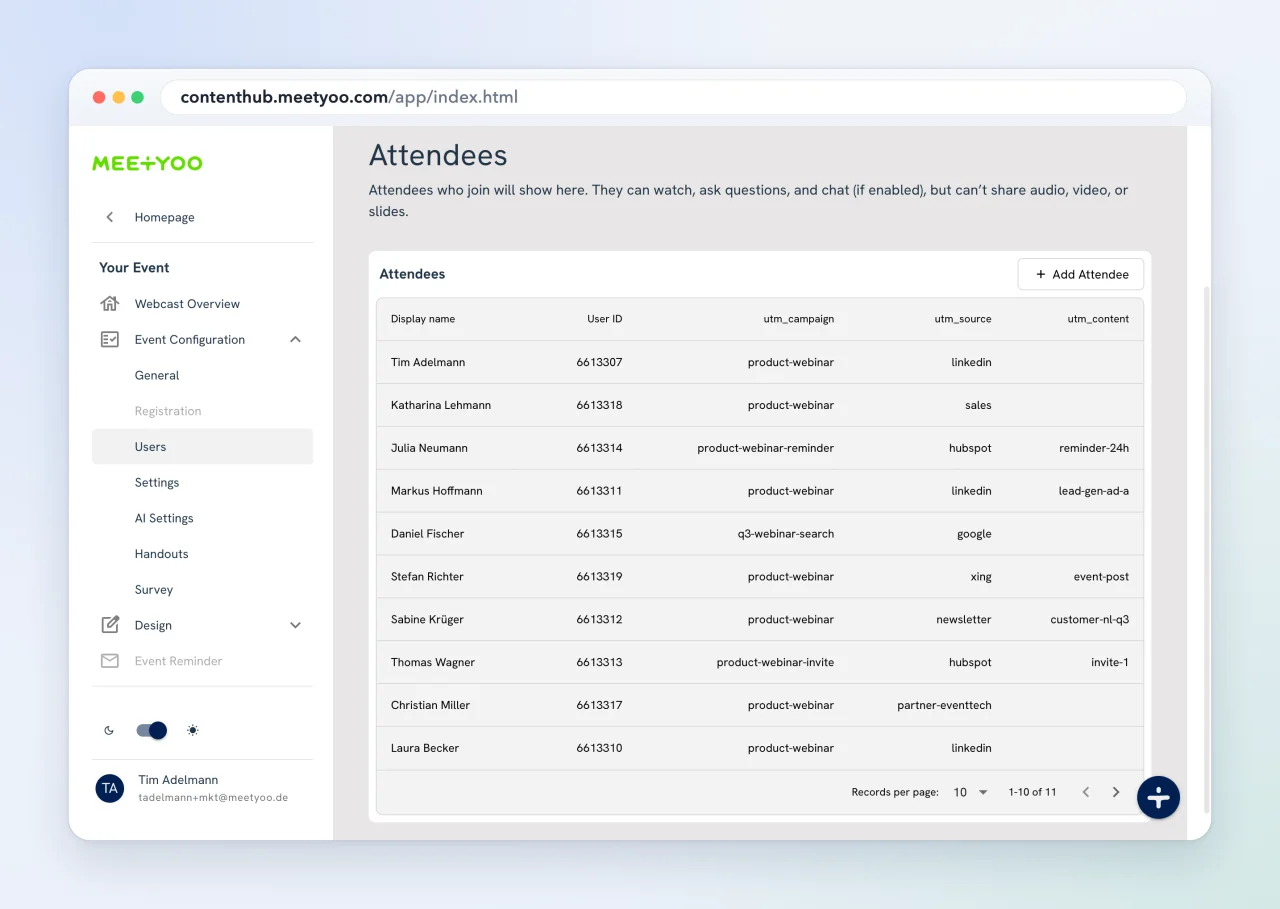
Attendee overview in MEETYOO Show with captured UTM values per person
Proof in the product: UTM values per attendee.

More levers

Registration, interaction, and reporting

These features turn reach and attribution into reliable lead signals.

  • Quick login with name
  • Long form with custom fields
  • HubSpot form
  • Webhook & SSO

Flexible registration

Choose how much friction fits each campaign—and where registration data comes from.

Combine with UTM tracking

Engagement toolkit

Surveys, polls, Q&A, and public chat—every interaction becomes a signal for your follow-up.

Explore the engagement toolkit

Analytics for lead scoring

See per person whether they watched live, on demand, or both—and how they interacted. Export any table as CSV for segmentation and lead scoring in your CRM.

Explore webcast analytics

After: make content last

Turn the recording into an on-demand destination

Once the campaign has run, the webinar keeps working. AI chapters, summaries, and Chat with Webcast help your audience find exactly the moment they are looking for.

  • AI chapters and key moments for fast navigation
  • Summaries and transcripts for recaps and follow-up emails
  • Chat with Webcast answers questions straight from the content

Pre-flight

Planning check before go-live

Tick off what is ready—or print the list for your campaign kickoff.

0 of 6 done

Before the event
During the event
After the event

Webinar marketing questions

Concrete answers on Pseudo-live, UTM tracking, redirects, and lead scoring.

  • Can I make an on-demand webinar feel like a live event?

    Yes, with Pseudo-live. You add a recording and set the start time. Attendees see a countdown, then the video starts for everyone at once. You decide when the recording becomes regularly available on demand.

  • Are UTM parameters stored in the attendee profile?

    Yes. You add a hidden query parameter field for each parameter, for example utm_campaign. MEETYOO Show takes the value from the event URL—on registration and on login with name and custom fields. This also works with your own parameters, such as partner or campaign IDs.

  • What happens when a webinar ends?

    With the post-event redirect, attendees are sent to any URL when the session ends, such as demo booking, a content download, or a thank-you page. The target URL can include the user ID so you can attribute the conversion to webinar attendance. Without a redirect, attendees stay on the thank-you screen.

  • Which interactions are available during a webinar?

    The engagement toolkit includes surveys, polls, Q&A, and public chat. You decide per event which features are active. You will find the results in webcast analytics afterwards.

  • Which registration types does MEETYOO Show support?

    Flexible registration ranges from quick login with name and long-form registration with custom fields to registration via HubSpot form or webhook. That way you can match the friction to each campaign.

  • How does webinar data get into our CRM and lead scoring?

    Webcast analytics shows attendance and interactions per person. You can export any table as CSV, import it into your CRM or marketing automation, and use it there for segmentation and lead scoring.

Can't find the answer you're looking for?

Contact Our Team

Your next webinar

Plan your webinar campaign with us

Tell us about your campaign, audience, and funnel. We will show you how Pseudo-live, campaign parameters, and the post-event redirect fit your setup.

Talk through your marketing use case

Share the event format, campaign goal, and the tools your data should flow into.

We usually reply within 1 business day. No commitment.

GDPR compliant · ISO certified · Made in Germany