

For Investor Relations

Earnings calls under control: before, live and in the archive

MEETYOO Show gives IR teams one controlled event: access you define per audience, a live transcript for speakers and assistants, and an archive investors and analysts can revisit. Phone dial-in and managed live audio Q&A come with our investor-event service.

  • Access per audience: registration for investors, open or name-only for the public
  • Live transcript for speakers, moderators and C-suite assistants
  • On-demand archive with chapters for follow-up
Investor event lifecycle: set access before the call, control the live moment, make the archive retrievable afterwards.

Selected MEETYOO customers

Banks and public authorities trust our security and EU servers. Software made in Germany.

  • Redundant availability Built to keep your call online, because an earnings call cannot be repeated.
  • TV quality Professional overlays, lower thirds and virtual studios for a broadcast-grade picture.
  • ISO 27001 ISO 27001-certified platform and data centres in the EU.
  • GDPR GDPR-compliant processing, hosted on EU servers.

One frame for IR, Comms, IT and Legal

Three decisions every investor event has to settle

IR rarely decides alone. Use these three outcomes to get Investor Relations, Communications, IT and Legal on the same page before you plan the details.

  1. Access & audiences

    Who may join and how they get in: registration for investors, open or name-only access for the public audience.

  2. Production & presence

    How speakers join and appear on screen, and how the assistants around the C-suite follow every question live.

  3. Governance & archive

    What stays retrievable after the call, for whom and for how long, including the questions that were asked.

Standard webinar tool vs. MEETYOO investor event

Standard webinar tool

Open link, open chat, files somewhere

  • Anyone with the link can join
  • Questions get lost in the chat
  • Recording and slides end up in different places
  • Everyone sees everyone, even when investors do not want to share who is listening in
MEETYOO investor event

Controlled access, moderated Q&A, retrievable archive

  • Access defined per audience
  • Moderated Q&A in a clear order
  • One archive for recording and context
  • Only the organiser sees attendees, questions and who wants to ask. Ignored questions stay private and users can be blocked

Product feature

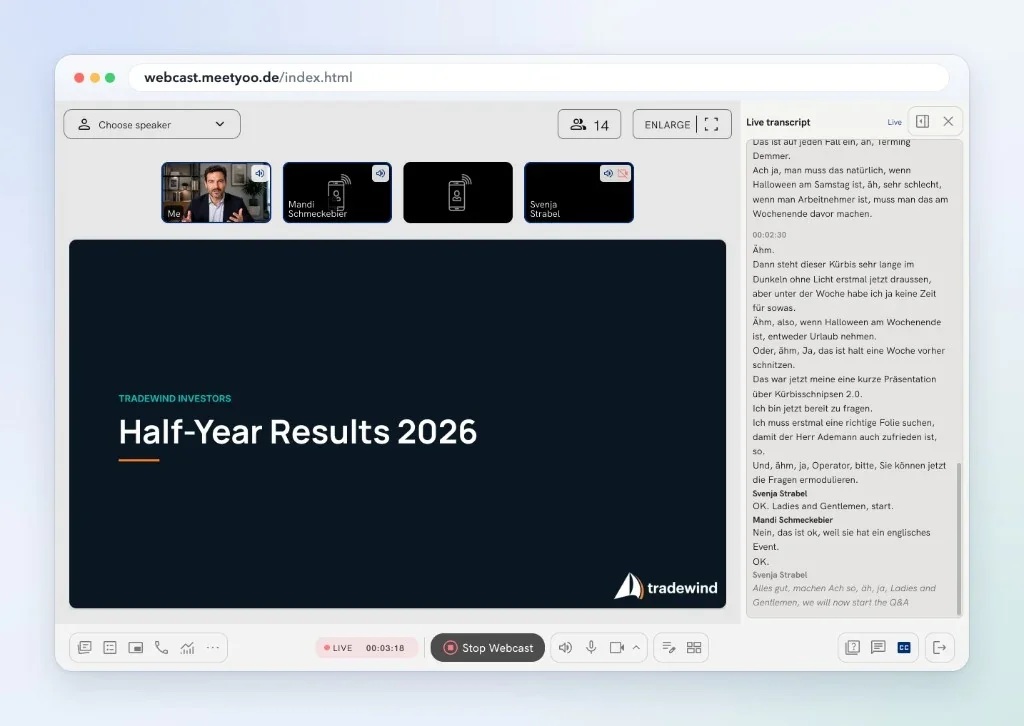
Live transcript

Every live audio question as text, the moment it is asked

On an earnings call the C-suite answers in real time. The live transcript shows the spoken words as running text, so speakers, moderators and the assistants around them can follow along and prepare the next answer.

  • For speakers and moderators. Follow the call as text in the presenter view, right next to the stream.
  • For C-suite assistance. Assistants see every question right away and can prepare figures and answers.
  • Live audio investor questions marked. Questions from the audience are labelled as such in the transcript.
See AI features
Presenter view with the live transcript panel open next to the speakers and the presentation slide during an investor call
Live transcript panel in the presenter view

What IR teams actually run with us

Phone, live audio questions and audience groups: the managed investor-event setup

These capabilities belong to our managed service for investor events. Our production team sets them up with you and runs them during the call, so they are not self-serve switches.

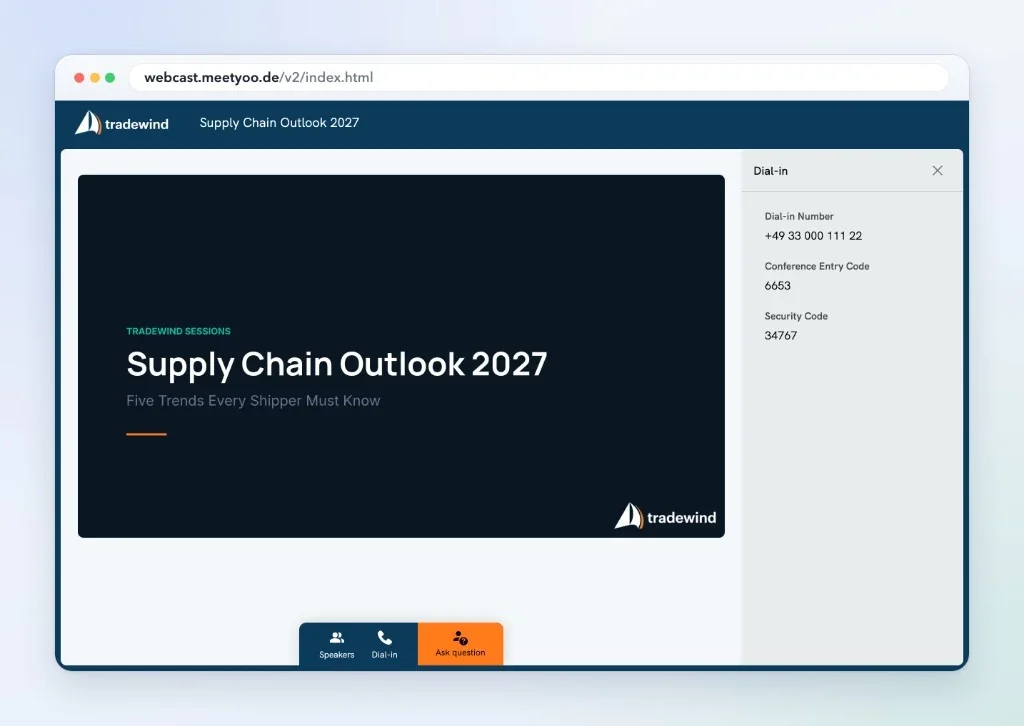
  • Participant view with the dial-in panel showing the dial-in number, conference entry code and security code next to the Ask question button

    Web and phone dial-in (PSTN)

    Investors and analysts join the way that suits them. Everyone starts listen-only and can raise a hand to signal a question.

    • Web dial-in Join from the browser with the integrated soft phone. No telephone needed: one click and you are in.
    • Phone (PSTN) Dial in by telephone and verify with a PIN.

    Managed service

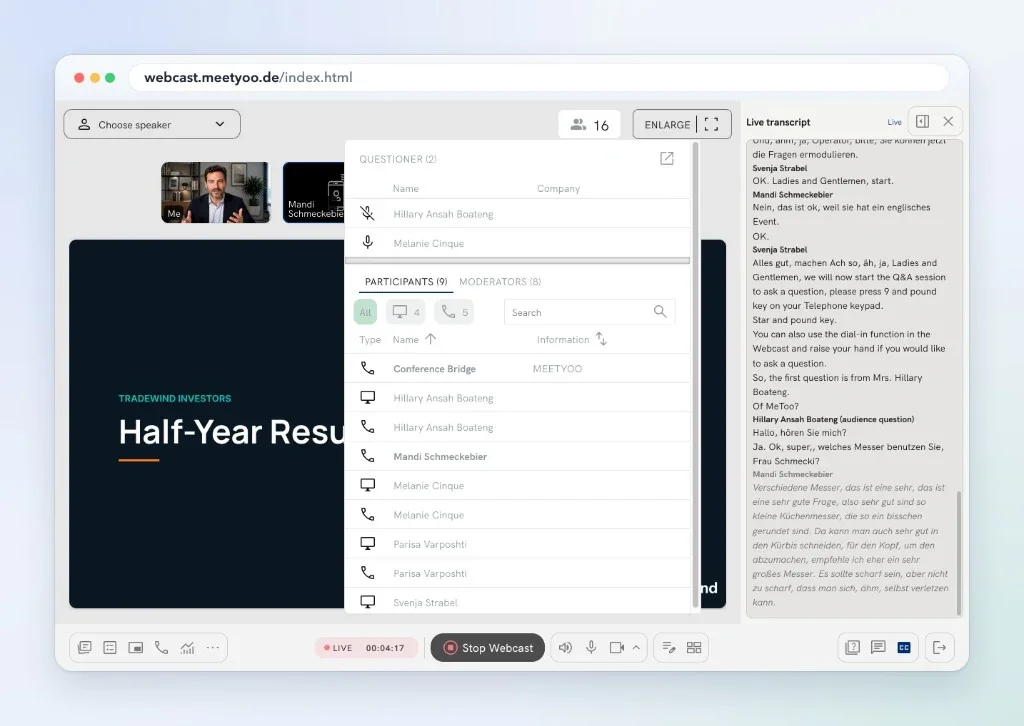
  • Moderator view with the list of questioners, the participant list with phone and web participants marked, and the live transcript

    Live audio question queue

    Callers start listen-only and raise their hand to signal a question. Accepted questions go on air live, and the moderator, who can also be your own team, decides who goes on air. Only the organiser sees who wants to ask.

    Managed service

  • Split user groups

    Investors register to join, the public audience joins openly or with just a name. Everyone sees the same content, and investors can also dial in.

    Managed service

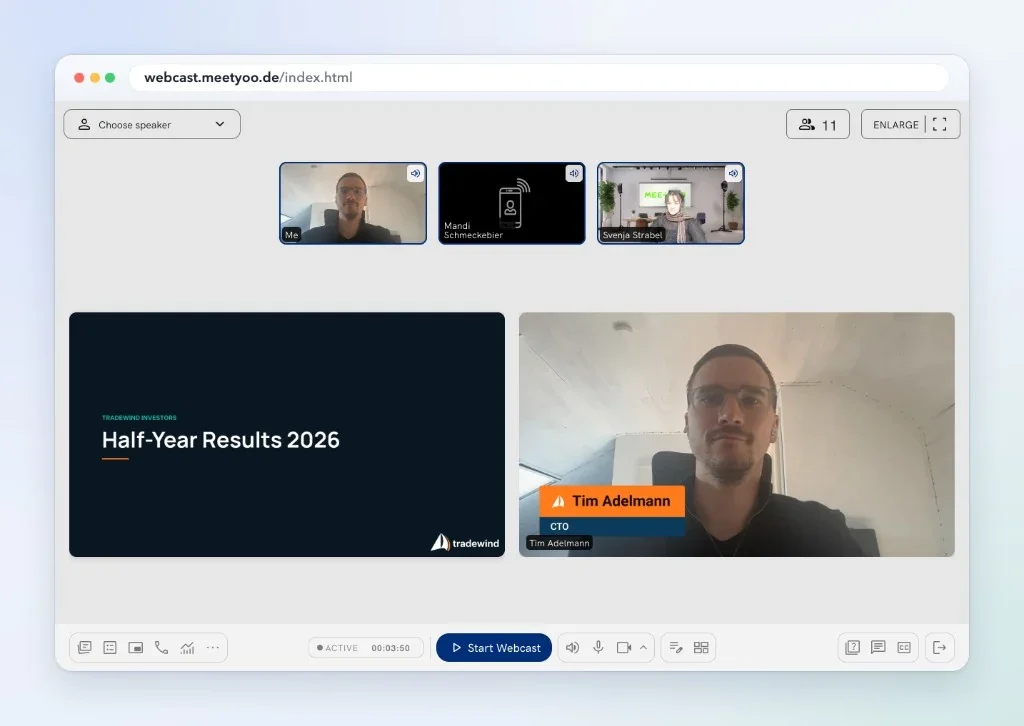
  • Presenter view with speakers joined by webcam and by phone, and a lower third on the speaker's video

    Speaker join by phone or webcam

    Every speaker joins the way that suits them: by webcam or by phone.

    Managed service

Live transcript, access modes, branding and the archive are part of the product. Dial-in (web and phone), the live audio question queue, split user groups and speaker join by phone are set up together with our team. Tell us about your event and we will scope the right setup.

Presence on screen

Your brand and your speakers, exactly as you want them on screen

Investors judge how management appears. Lower thirds, overlays and backgrounds are part of the product, so every speaker looks like part of your company, whether they join from the boardroom or from home.

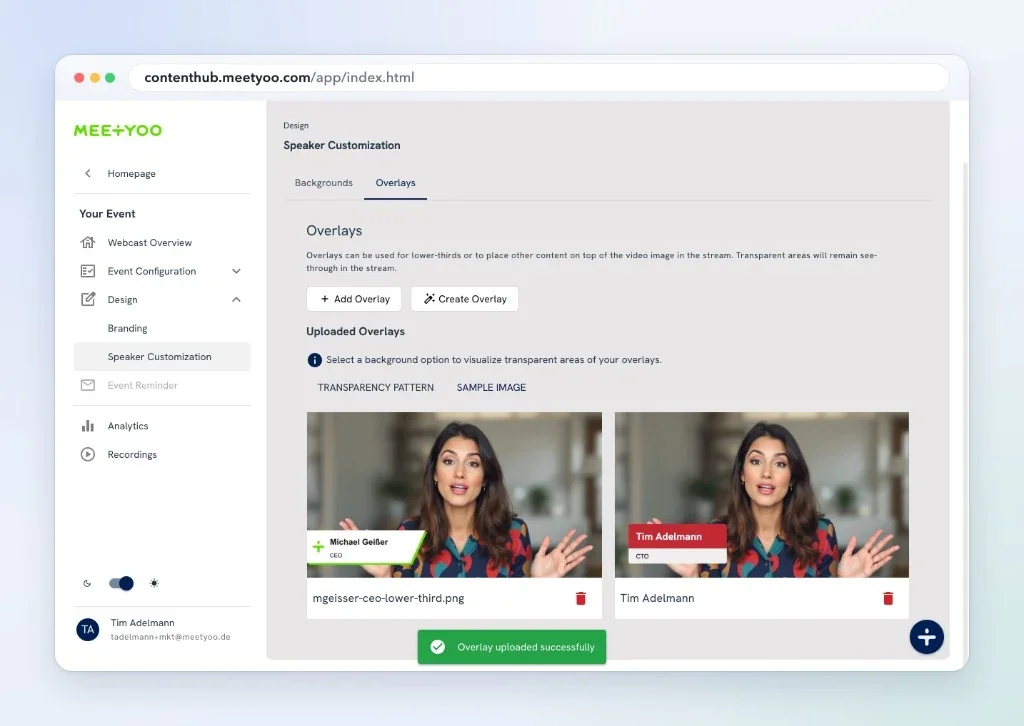
  • Overlay gallery in the speaker customization settings with two lower thirds previewed on a sample image

    Product feature

    Lower thirds and overlays

    Show names and titles as lower thirds or place any content on top of the video image. Upload your own overlays or create them with the overlay creator. Transparent areas stay see-through in the stream.

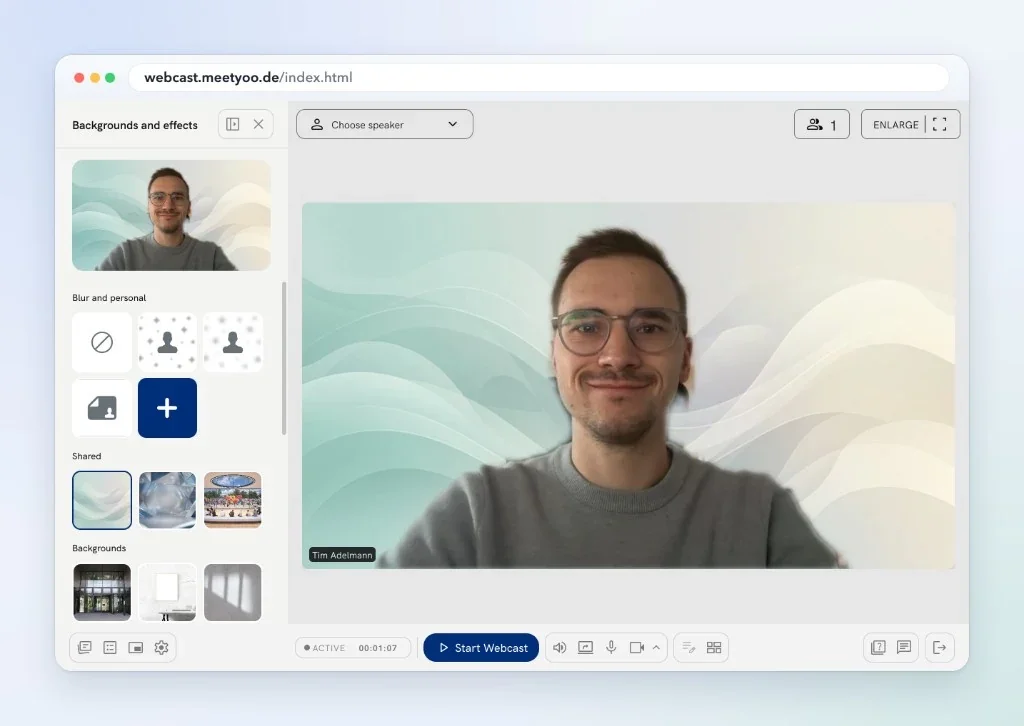
  • Presenter view with the backgrounds and effects panel open and a speaker in front of a shared background

    Product feature

    Backgrounds and effects

    Speakers pick a blur, a shared company background or their own image before they go live, so the picture stays consistent across the whole line-up.

More about webcast design

Pre-flight

Investor event readiness check

Align IR, Comms, IT, Legal and Production. Tick what is ready, or select the items you need and save them as a PDF. Every item shows who owns it.

0 of 12 done

Before
Live
Archive

Questions from investor relations teams

Start with the questions that help you align the people responsible for a high-stakes event.

  • Can MEETYOO Show support investor-facing events?

    Yes. MEETYOO Show supports investor-facing events such as earnings calls and analyst days. Access is set per audience, the live transcript lets speakers and assistants follow every question, investors can join by web or phone dial-in, and the archive keeps the recording, chapters and questions retrievable. Discuss your governance and production requirements with our team to scope the right setup.

  • How reliable and secure is an investor event with MEETYOO?

    The platform is built for events that cannot be repeated: redundant availability, TV-quality production with overlays and virtual studios, an ISO 27001-certified platform and GDPR-compliant processing on EU servers. MEETYOO is software made in Germany, and banks and public authorities trust us with their security requirements. If your IT or compliance team has its own requirements, we go through them together before the event.

  • What is the live transcript?

    A panel in the presenter view that shows the spoken words as running text during the event. Speakers, moderators and the assistants of your executives can follow along, and live audio questions from the audience are labelled in the transcript. It is available on every plan, although restrictions may apply. It supports multiple languages, including the most widely spoken European and Asian ones, in line with common transcription software. Latency varies.

  • Which features are part of the managed service?

    Dial-in (web and phone), the live audio question queue, split user groups and speaker join by phone are set up and run together with our production team for investor events. The live transcript, access modes, branding, the archive and AI chapters are product features.

  • Can investors join by phone?

    Yes, and they do not even need a telephone. With web dial-in investors join from the browser through an integrated soft phone, with one click. Those who prefer a regular call dial in by phone (PSTN) and verify with a PIN. Phone participants start listen-only and can raise their hand to signal a question. Both ways are part of the managed investor-event setup, and phone participants show up separately in the analytics.

  • Can investors see who else is attending?

    No. In every event type, only the organiser sees the attendee list. Attendees do not see each other. Organisers also see the questions and who wants to ask one. Written questions can always be ignored and are then not shared with the audience, and organisers can block users easily.

  • How do live audio questions work?

    In the managed setup, callers start listen-only and raise their hand to signal a question. If it is accepted, they ask it live over audio, and the moderator, who can also be your own team, decides who goes on air. The live transcript shows the question as text, so your team can prepare the answer right away.

  • How can attendees revisit an event after it ends?

    The recording stays available on demand, with AI chapters and key moments for navigation. Questions and answers stay retrievable and can be exported. Confirm the access window and retention with our team to match your requirements.

Can't find the answer you're looking for?

Contact Our Team

Plan the critical moment

Discuss your next investor event with a specialist

Share the event format, audience, timeline, and operational requirements. We will help you explore an appropriate setup.

Talk through your earnings call or analyst day

Give us the context we need to include the right event and production specialists.

We usually reply within 1 business day. No commitment.

GDPR compliant · ISO certified · Made in Germany