
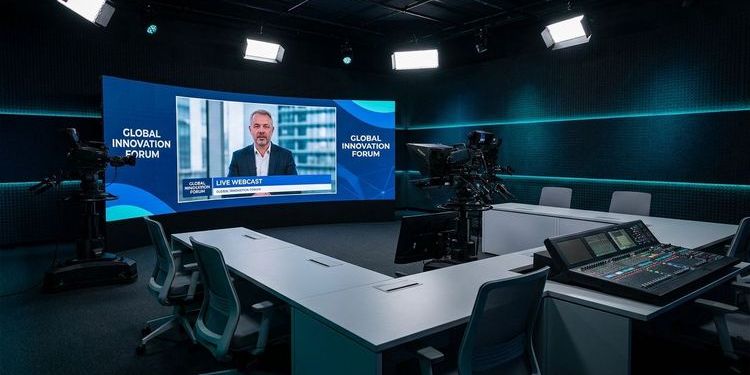
Microsoft Teams Live Events will be shut down on 30 June 2026. If you haven't made a decision yet, you need a Teams Live Events alternative: either Teams Town Hall or a specialised webcast platform.
Which option fits depends on your concrete requirements — not on migration effort. This article puts both paths side by side: full timeline, comparison table, and a migration checklist.
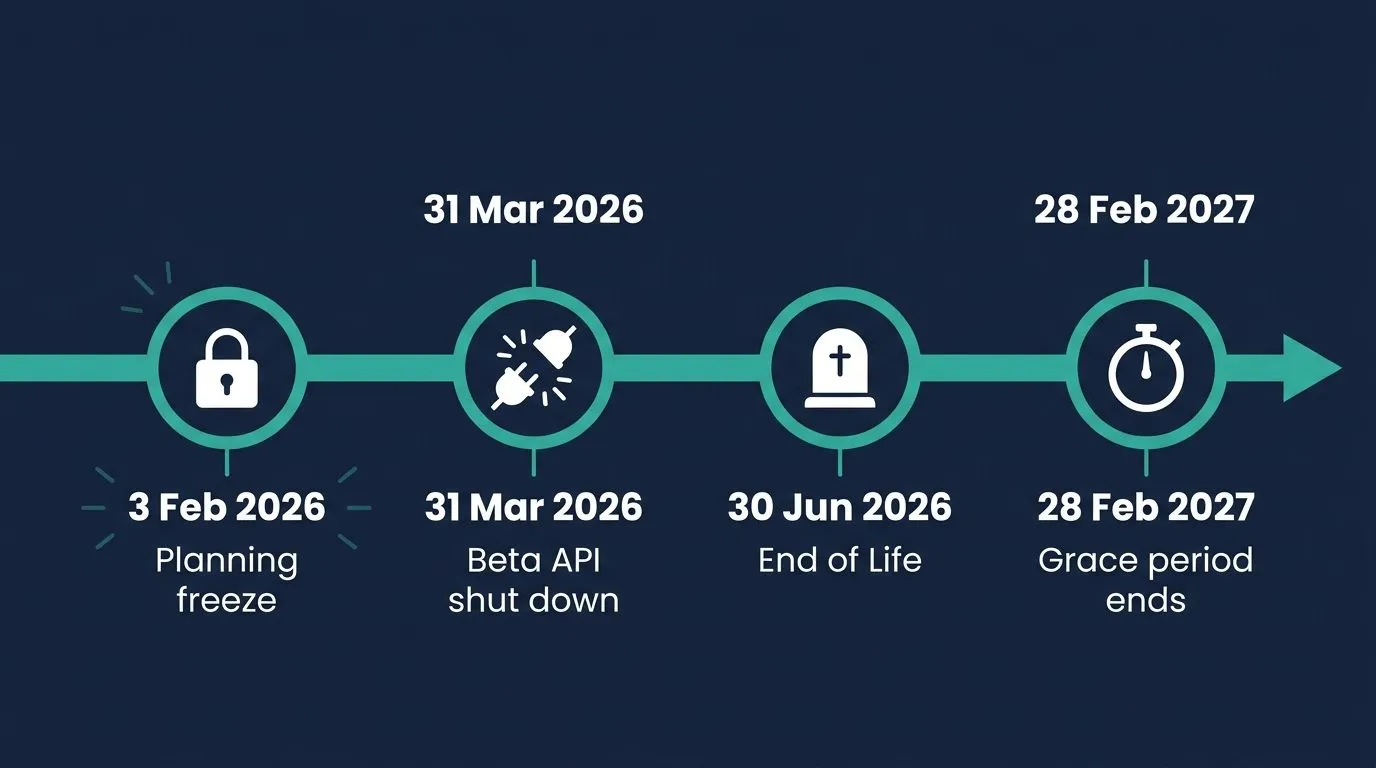
The exact timeline: what happens when
3 February 2026 — Planning freeze From this date, no new Live Events could be scheduled for dates after 30 June 2026 — neither through the Teams interface nor through Dynamics 365.
31 March 2026 — Graph Beta API shut down
The isBroadcast property in the Microsoft Graph Beta API, used by many third-party tools and custom scripts to manage Live Events, was switched off on this date. IT teams with custom integrations need to have migrated to the new Virtual Event APIs by 30 June.
30 June 2026 — Official end of life From this day, Live Events can no longer be planned, started, or joined. The Graph Production API will be fully shut down.
28 February 2027 — End of grace period Events scheduled before 30 June 2026 will continue to run until this date. After that, there are no exceptions.
For IT admins: Check whether custom scripts or third-party apps are still accessing the Live Events Graph API. The Beta API has been shut down since 31 March — the Production API follows on 30 June. Missing this deadline risks failures in live event workflows.
Teams Town Hall: the official successor
Microsoft developed Teams Town Hall as the direct successor, generally available since October 2023. Town Hall brings real improvements over Live Events, keeps important features intact — and removes one.
What has improved: Maximum event duration increases from four to 30 hours. Capacity limits have been significantly extended through the new Attendee Capacity Packs. And many features that previously required Teams Premium are included in the standard Teams Enterprise licence from April 2026 — events with up to 3,000 interactive participants and 10,000 view-only attendees at no extra cost.
What remains: RTMP-In is still available — external encoders can be integrated as before, essential for AV studios and production teams.
What has been removed: RTMP-Out — streaming to platforms like LinkedIn or YouTube — is not available in Town Hall. Anyone who used Live Events for external streams needs a different solution for this.
Two points where misconceptions persist:
First: The number of concurrent events remains at 15 for standard Enterprise — identical to Live Events. The 50 simultaneous events apply to Teams Premium and were not included in the standard licence in April.
Second: Full Meeting Themes — custom colours, logos and images on the Live Stage itself — also remain a Teams Premium feature.
On licensing from April 2026: Many Premium features are now included in Teams Enterprise — but not all. 50 concurrent events and full Meeting Themes still require Teams Premium. Anyone planning on these should confirm with their Microsoft partner before scheduling events.
Unified Events from April 2026: Since 1 April 2026, Microsoft has combined Teams webinars and Town Halls in a single interface — the Teams Events Experience in the Meet app. Event teams have everything in one place; the features themselves remain unchanged.
Live Events vs. Town Hall: key differences at a glance
The table below shows the most important technical differences — including the changes introduced by the April 2026 licensing updates.
| Live Events | Town Hall Standard | Town Hall Premium | |
|---|---|---|---|
| Capacity | 10,000 view-only | 3,000 interactive / 10,000 view-only | up to 100,000 (Capacity Pack) |
| Concurrent events | 15 | 15 | 50 |
| Maximum duration | 4 hours | 30 hours | 30 hours |
| RTMP-In | ✅ | ✅ | ✅ |
| RTMP-Out | ✅ | ❌ | ❌ |
| Branding on Live Stage | ❌ | ❌ | ✅ (Meeting Themes) |
| Automatic recording | ✅ | ✅ | ✅ |
| Transcript | ✅ | ✅ | ✅ |
| Intelligent Recap | ❌ | ❌ | ✅ (Teams Premium or Copilot) |
| Q&A | up to 10,000 att. | up to 100,000 att. | up to 100,000 att. |
Where Town Hall falls short — and when an alternative makes sense
Town Hall is a workable choice for small, informal meetings without production requirements. For professional corporate communication — internal or external — its limitations become apparent quickly.
Branding stays Microsoft design — without Premium
Town Hall allows a banner, logo and accent colour for invitations and the pre-join screen. On the Live Stage itself, the standard Microsoft layout remains unless a Teams Premium licence is in place. For external events with customers, investors or partners, this means your brand takes a back seat while Microsoft's takes the front. But the same applies internally: a CEO update in a generic Microsoft layout sends a different signal than an event in the company's own corporate design.
No content repurposing after the event
Town Hall records and creates a transcript. That is where automatic post-event value creation ends. No chapter markers, no searchable archive, no assistant through which participants can ask the video questions afterwards. Anyone wanting to extract value from an event beyond the live moment has to organise that manually.
Failover fails in professional studio setups
Many companies produce all-hands meetings or CEO updates from a studio using Blackmagic ATEM mixers. A backup encoder is set up to take over if the primary stream drops. Town Hall requires the primary and backup encoders to send to two different endpoints. Typical Blackmagic configurations send both streams to the same URL — failover does not engage. With 500 viewers watching, a stream outage is not an IT incident. It is a communication failure.
Q&A loses control at scale
During an all-hands with 500 employees, 150 to 300 questions can come in within 20 minutes. Town Hall displays them unfiltered in chronological order — no prioritisation, no categorisation, no assignment to individual speakers. The moderation team fights the interface instead of the content. Relevant questions get buried. This is not an edge case at large internal events — it is the norm.
Analytics stay at the surface
Attendance reports and basic engagement data are available. But if you want to know which locations were most active, where attention dropped off, or which questions point to genuine interest or need for follow-up — Town Hall does not have the answers.
GDPR: US corporate jurisdiction
Teams stores and processes event data in Microsoft data centres. EU-based server locations exist, but the company behind them is American. For banks, pharmaceutical companies and public authorities in the DACH region, this can require a complex legal review.
When is Town Hall sufficient? For small, informal departmental meetings under around 100 people, where no studio is involved, branding does not matter, a technical failure would be tolerable, and no post-event reporting is needed — Town Hall can be sufficient.
Three scenarios — and what makes sense for each
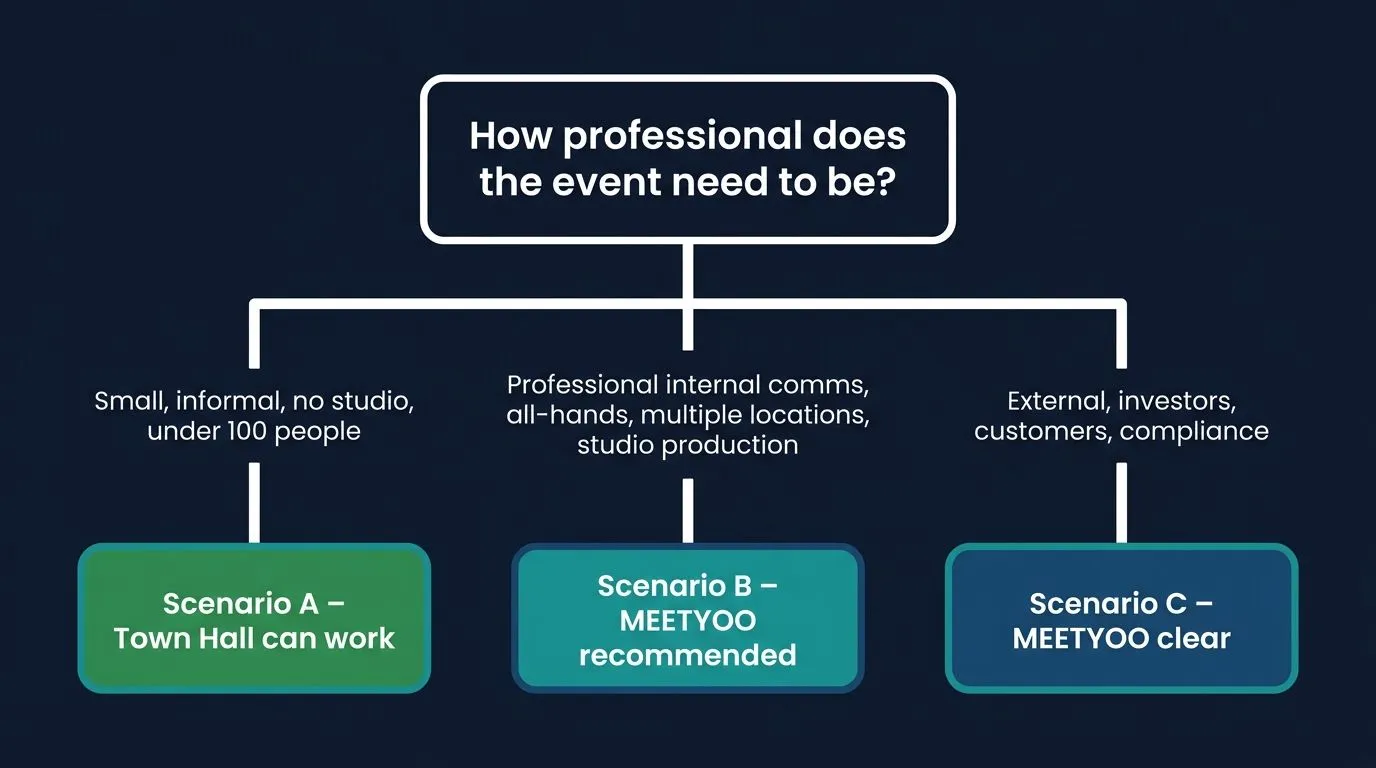
Scenario A: Small departmental meetings without production requirements
Informal check-ins under around 100 people, no studio, no branding requirements, deeply embedded in the M365 ecosystem. In this clearly bounded case, Town Hall can suffice — provided a technical failure is tolerable and participant data does not need to be analysed.
Scenario B: Professional internal corporate communication
All-hands with several hundred employees, strategy updates, HR communication, events with multiple locations simultaneously — the formats where MEETYOO is strongest internally. Corporate design belongs on the stage in internal communication too, not the Microsoft layout. A studio setup with real failover is not a luxury, it is standard practice. And when 200 questions are coming in, Q&A management determines whether the event feels professional or chaotic.
Scenario C: Business-critical events with external stakeholders
CEO town halls with investors, earnings calls, compliance training, large customer events. Everything from Scenario B applies here — plus the full weight of external perception, regulatory requirements and publicly visible brand communication. Full branding, GDPR-compliant EU servers and demonstrable ROI are non-negotiable for these formats.
Teams Live Events alternative: what MEETYOO Show does differently
For organisations looking for a Teams Town Hall alternative that needs more than the basics, MEETYOO Show is the natural Made-in-Germany option. What is concretely different:
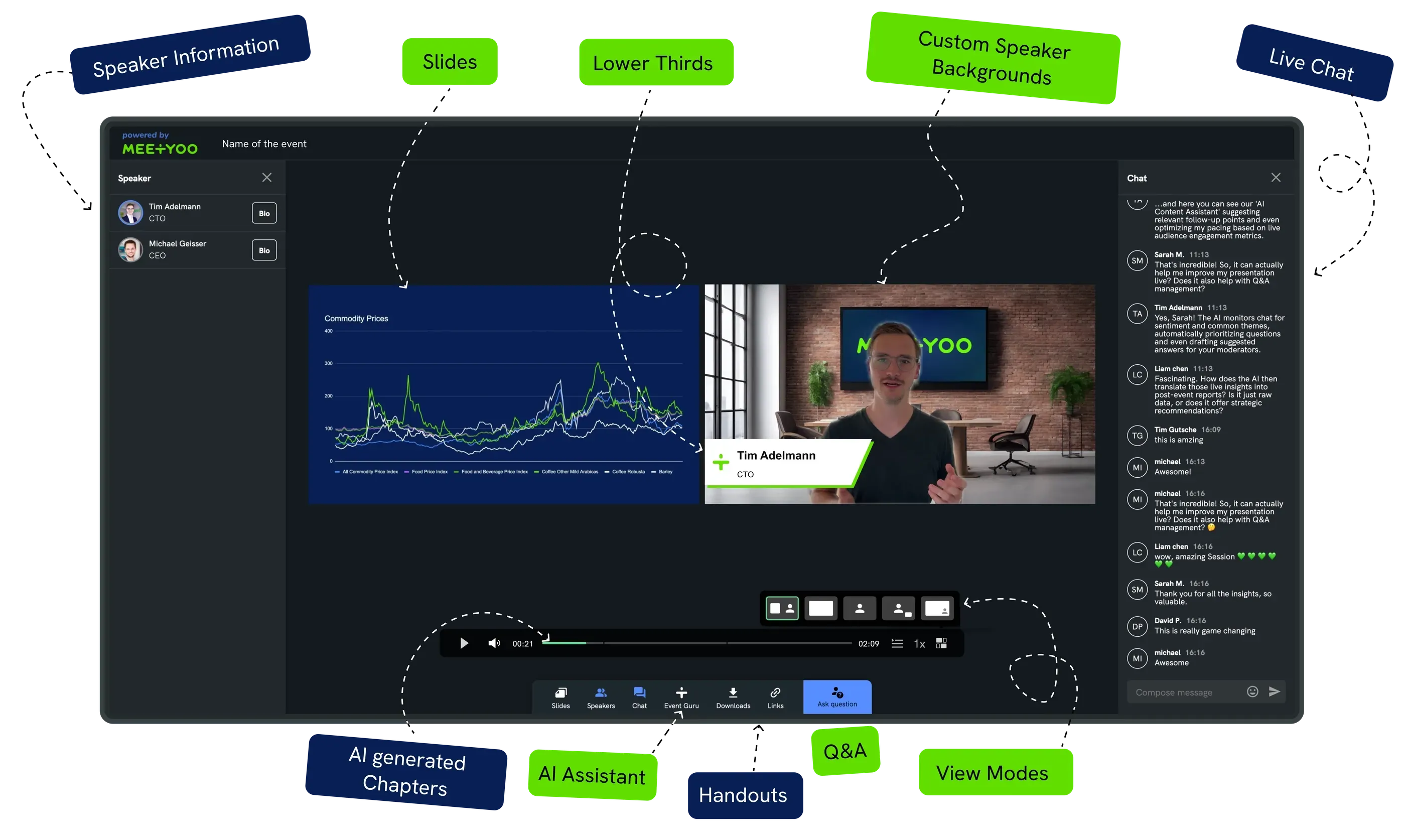
Branding on the Live Stage — internally too, without compromise From the registration page through the event interface to the on-demand recording: everything in your corporate design. Professional overlays, virtual studios, lower thirds — MEETYOO does not appear; only your brand does. This applies to the earnings call as much as to the all-hands with 800 of your own employees.
→ All MEETYOO branding features
Studio production with real failover MEETYOO provides two independent RTMP endpoints for every event — primary and backup. If the primary stream fails, the backup takes over invisibly for the audience. This works with Blackmagic ATEM, OBS and all common production systems. No manual intervention, no visible outage, no awkward "we're experiencing technical difficulties" in front of 800 viewers.
From one event, an archive Every webcast is automatically transcribed, divided into thematic chapters and prepared for on-demand use. Viewers can ask the video direct questions after the event — with a timestamp link to the right moment, without any manual follow-up work.
→ MEETYOO AI features in detail
Enterprise security, Made in Germany ISO 27001 certified, GDPR-compliant, server location Germany. No compliance adjustments after the fact, no Schrems II risk. That is the starting position — not the outcome of an audit.
Q&A and engagement that holds up at scale Moderated Q&A with automatic AI labelling, upvoting, chat and speaker assignment — this holds up with 300 simultaneous questions. The moderation team stays in control, relevant questions come through, the rest stays moderated in the background. Behind it sits an analysis that shows who watched actively and for how long, and which questions came from which audience groups — by location, department, engagement level.
Service on demand: production team for the moments that matter MEETYOO Show is self-service — but with an option that Teams Town Hall and most webinar tools simply do not offer. For the events where you want to hand over responsibility, an experienced MEETYOO production team takes full ownership: setup, rehearsal, live operation, post-event asset delivery. You focus on content and audience.
That is why Commerzbank, Mercedes-Benz and Allianz GI use MEETYOO: not only because the software is capable, but because the expert team behind the software delivers when it matters.
→ All webcast platforms compared: The 10 best solutions for 2026
Who uses MEETYOO: Commerzbank, Mercedes-Benz, Allianz GI, L'Oréal, Merck, Siemens, SAP, AutoScout24.
Migration checklist: what to do now
Immediately
- Identify all Live Events scheduled after 30 June 2026 and migrate them to Town Hall or a new platform
- IT checks: are custom scripts or third-party apps still accessing the Live Events Graph API? (Beta API gone since 31 March, Production API follows 30 June)
- Update internal wikis, guides and communication plans that still list "Teams Live Events" as an active tool
By end of June 2026
- Make the decision: Town Hall or specialised platform
- If switching platforms: start a demo or trial, complete the evaluation in time
- Onboard event teams into the new interface — better to practise a week early than the day before
Medium term
- Back up recordings from Live Events
- Rebuild the event strategy based on the chosen platform
- Adjust analytics reporting and KPIs
Conclusion
Microsoft is replacing Live Events with Town Hall. For small, informal meetings without production requirements, that is sufficient. But anyone running professional corporate communication — internally or externally — will quickly notice: the platform has changed names, not nature. Town Hall is a meeting feature inside a collaboration tool — not a broadcast platform.
MEETYOO Show is permanently free on the Forever Free Plan — theming features, all AI features, up to 500 registrations, no expiry date, no credit card required.
FAQ
When exactly will Teams Live Events be shut down?
The end-of-life date is 30 June 2026. From that day, Live Events can no longer be planned, started or joined. Events already scheduled before 30 June 2026 will continue to run until 28 February 2027.
What is the successor to Teams Live Events?
The direct successor is Teams Town Hall, generally available since October 2023. For organisations that run more than informal departmental meetings, a specialised Teams Live Events alternative like MEETYOO Show is the better choice. Since April 2026, Town Hall is part of the unified Teams Events Experience in the Meet app — alongside Teams webinars.
How many participants does Teams Town Hall support?
With the standard Teams Enterprise licence: up to 3,000 interactive participants and up to 10,000 view-only attendees at no extra cost. For events up to 100,000 attendees, paid Attendee Capacity Packs are available in tiers of 5,000 to 100,000.
How many events can I run simultaneously with Town Hall?
With standard Teams Enterprise: 15 concurrent events — identical to Live Events. The 50 simultaneous events apply to Teams Premium and were not among the features moved into the standard licence in April 2026.
What do IT admins need to do right now?
Check whether custom scripts or third-party tools are still accessing the Live Events Graph API — Beta API gone since 31 March, Production API follows 30 June. Also identify all events scheduled after 30 June and migrate them.
Is Teams Town Hall sufficient for internal all-hands?
It depends on the requirements. For informal meetings under around 100 people without production requirements — yes. For professional all-hands with several hundred employees, studio production, failover requirements and moderated Q&A — no. MEETYOO is particularly strong for internal corporate communication, because branding, failover and Q&A management matter internally too.
Is Teams Town Hall GDPR-compliant?
Teams processes data in Microsoft data centres that offer EU-based locations but operate under US corporate jurisdiction. For regulated industries, a legal review is recommended. Anyone wanting to avoid that risk should choose a platform with exclusively German servers.
When does a specialised webcast platform make more sense than Town Hall?
As soon as professional corporate communication takes place — internally or externally. Specifically: when studio production with real failover is needed, when Q&A at large events needs to be moderated and prioritised, when full CI branding is required, when location-based analytics are needed for internal communication strategy, or when GDPR-compliant EU servers are a given requirement.


