
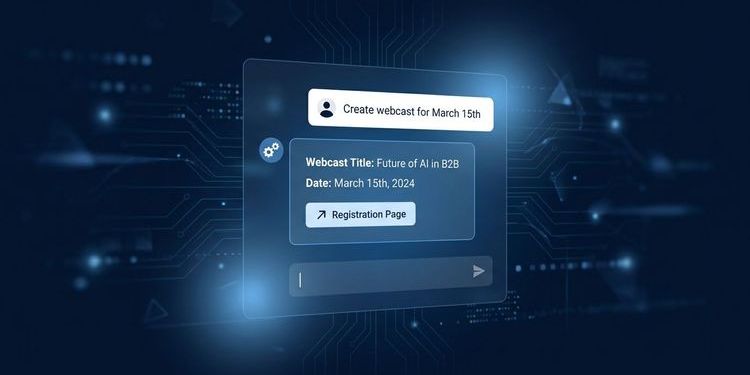
The MEETYOO AI event assistant builds events, cuts highlight videos, writes follow-up emails, and searches transcripts – by conversation, directly in MEETYOO Show. No separate AI tool, no copy-pasting between systems, no click marathon through nested menus.
For teams producing multiple events per month, this gives back the capacity that used to disappear into operational work. Event setup, follow-up, documentation – all of it runs automatically.
Why event preparation takes so much time – and where the AI event assistant steps in
The actual event lasts 60 minutes. The work around it takes a multiple of that. For every single event, every time.
Before the event: Configuring event details, building registration pages, writing confirmation and reminder emails, designing overlays, managing accounts. For every new event, often with minimal differences from the last format.
After the event: Reviewing transcripts, cutting highlight clips, writing follow-up communications, setting chapters, summarizing insights.
According to Jotform's own research, 79% of event professionals want to use AI for productivity gains and workload reduction. The willingness is there. What has been missing are tools that actually intervene in the workflow and execute tasks autonomously – rather than delivering drafts that have to be transferred manually.
The MEETYOO AI event assistant is built as an agent, not a chatbot. It doesn't just answer questions – it executes tasks completely.
AI agent vs. chatbot: A chatbot responds. An agent acts. The MEETYOO AI agent is integrated directly into MEETYOO Show, has access to your event data, and executes tasks – creating events, scheduling emails, cutting clips – without you needing to copy or manually transfer anything.
What makes MEETYOO Show different from generic AI tools
There is a common misconception here: many tools advertise AI features that, in practice, deliver drafts. The human does the rest. MEETYOO Show is built differently – for four concrete reasons.
Platform-native execution. The assistant knows your events, your account structure, and your settings. It doesn't need to retrieve data externally or reimport anything. Everything happens within MEETYOO Show.
Execution all the way through. The event is created, the email is scheduled, the clip is ready. No half-finished draft that still needs to be uploaded manually.
Parallel processing. Cutting highlight clips and writing follow-up emails run simultaneously. The assistant doesn't wait for one step to finish before starting the next.
GDPR-compliant AI processing on EU servers. All processing steps – transcripts, prompts, video data – take place on ISO 27001-certified servers in the EU. For banks, pharmaceutical companies, and public institutions, this is a hard requirement. US-based AI platforms structurally cannot offer this.
The four core capabilities of the MEETYOO AI event assistant
1. Complete event setup by conversation
You describe your event in plain language – the assistant builds it. Title, description, date, time, registration page, speaker details, account structure: everything is configured through conversation.
A typical example:
"Create a webinar for March 15th, 10am, topic Q1 product update, with a registration page and two reminder emails – one week before and one day before."
The assistant configures the event, builds the registration page, and schedules the emails – directly in MEETYOO Show.
Particularly relevant for recurring formats: monthly townhalls, quarterly updates, regular customer webinars. The assistant knows your existing events and varies the details without starting from scratch every time.
2. Content creation directly from the recording
Immediately after the event, the assistant produces:
Video highlights: Relevant sequences are identified and cut – key statements, engagement spikes, content-dense passages. No external video editing software, no briefing an editor.
Custom overlays: Based on the transcript and your CI, the assistant designs visual elements – speaker overlays, title cards, quote graphics.
Follow-up emails: The assistant writes follow-up communications based on the transcript. Key takeaways, links to the recording, further resources – fully written, ready to send. Separately for attendees who were live and for registrants who didn't show up.
A webcast doesn't end when the stream stops. It becomes a source for LinkedIn posts, sales decks, and internal documentation.
Tip: Have the assistant automatically create a summary, three video highlights, and a post draft immediately after each event. The material is instantly usable – for sales teams, social media, and internal documentation.
For a deeper look at how AI turns a single webcast into an entire content portfolio: AI webcast content ROI: more than a transcript
3. Transcript analysis by question
What did the speaker say about the roadmap? Which topics generated the most questions? Where were the engagement spikes?
You ask the assistant the question – it responds with a timestamp, context, and a direct link to the corresponding moment in the recording. This replaces manually scrubbing through recordings for management reports, sales briefings, or preparing the next event.
These features additionally run automatically in the background:
- Automatic chapter generation: Logical chapters with titles appear a few minutes after the session ends.
- Key moment detection: AI marks important slides, emphasis points, and engagement spikes on the video timeline.
- Smart Q&A labels: Incoming questions are automatically tagged (Priority, Technical, Feedback, Logistics) and sorted by relevance.
The recording is actively searchable and analyzable.
→ Discover Chat with Webcast and all AI analysis features
4. Parallel task processing
The assistant works on multiple tasks simultaneously. After a product launch webcast, a typical task list might look like this:
- Cut highlight clips from three key moments
- Write follow-up email for attendees
- Write separate email for no-shows
- Create summary for internal briefing
- Set chapters in the recording
- Generate three social media posts from key quotes
The assistant processes this list in parallel. You don't need to trigger each step manually or wait for the previous one to finish.
Step by step: how to integrate the assistant into your workflow
No technical knowledge required. A proven approach to getting started:
Step 1 – Hand over the event brief Describe your event in plain language: type, date, target audience, speakers, desired registration page structure. The assistant asks follow-up questions if anything is missing.
Step 2 – Adjust setup through conversation The assistant creates the basic structure. Give adjustments directly in chat: "Change the title to X", "Add a third reminder email."
Step 3 – Generate email communications Content bullet points and desired send times are all you need. The assistant writes complete emails.
Step 4 – Issue analysis instructions after the event Right after the webcast: "Create a summary of the three most important points, cut highlights from the key moments, and write the follow-up email." The assistant starts parallel processing.
Step 5 – Request insights In the days after the event, ask targeted questions of the transcript – for management reports, sales briefings, or planning the next event.
For teams with high event volume: Set up a standard workflow for your most frequent event format once (e.g., monthly townhall). The assistant varies the details, the basic workflow stays stable.
Typical use cases
CEO townhalls and all-hands meetings The assistant creates a summary for all attendees after the event, cuts key-moment clips, and writes the internal message for the workforce. The leadership team gets a finished report; the event team doesn't start from scratch.
Quarterly webinars and customer events Registration page, reminder emails, and post-event follow-up are generated from a short description. The team focuses on content quality and speaker preparation.
Compliance training and mandatory courses Transcript questions are answered directly, documentation is available on demand. Relevant for compliance records, GDPR training, and regulatory requirements in financial services.
Product launches and marketing webcasts Video highlights are available immediately after the event for social media, PR, and sales enablement. No external video editing assignment, no waiting time.
Investor relations and earnings calls Automatic chapters, transcript analysis, and structured summaries create an on-demand experience that meets regulatory requirements.
MEETYOO compared
| Generic AI tool | Meeting tool with AI add-on | MEETYOO AI event assistant | |
|---|---|---|---|
| Execute webcast setup | ✗ | ✗ | ✓ |
| Cut video highlights | Partially (export needed) | ✗ | ✓ directly in platform |
| Generate follow-up emails | ✓ (manual transfer) | ✗ | ✓ automatically |
| Transcript analysis with timestamp | ✓ (separate tool) | Limited | ✓ with deep link |
| GDPR / EU servers | Often unclear | Usually US servers | ✓ ISO 27001, EU |
| Platform-native execution | ✗ | ✗ | ✓ |
Microsoft Teams and Zoom are built for meetings. They transcribe – but don't execute webcast-specific tasks. US platforms like Goldcast or ON24 offer similar AI approaches, but process data outside the EU. For companies in regulated industries, this rules those options out.
ISO 27001, GDPR, EU servers – Made in Germany. All AI processing steps stay on certified EU servers. No data flows into the training of external models.
All AI features in MEETYOO Show
The AI event assistant coordinates and executes tasks. These features run alongside it:
- Chat with Webcast – ask questions directly of the recording, get answers with timestamp and direct link
- Automatic chapter generation – chapters appear minutes after the session ends
- Key moment detection – AI marks engagement spikes and content-dense passages
- Smart Q&A labels – automatic tagging of incoming questions in real time
- AI background generator – brand-aligned virtual backgrounds from a text description
→ Discover engagement and interaction features
Conclusion
The MEETYOO AI event assistant handles setup, content creation, and follow-up – completely, in parallel, GDPR-compliant. AI automation creates capacity for strategic work because the routine tasks run automatically.
For enterprise teams in regulated industries, processing on ISO 27001-certified EU servers is a hard requirement – and a clear advantage over US-based alternatives.
Try the AI event assistant for free in MEETYOO Show – forever, no credit card required.
FAQ
What can the MEETYOO AI event assistant concretely execute?
The assistant creates and configures events, builds registration pages, writes email communications, cuts video highlights, designs overlays, analyzes transcripts, and processes recurring tasks in parallel – by conversation, directly in MEETYOO Show.
Do I need technical knowledge or prompting experience?
No. You describe in plain language what you need. The assistant executes it or asks specifically when information is missing.
Is the AI assistant GDPR-compliant?
Yes. All processing steps take place on ISO 27001-certified EU servers. No data is used to train external AI models.
Can the assistant handle multiple tasks at the same time?
Yes. The assistant works through task lists in parallel. Cutting clips and writing emails run simultaneously, not sequentially.
Which event formats benefit most from the assistant?
Recurring formats (townhalls, customer webinars, training sessions) and events with extensive follow-up work (product launches, earnings calls, compliance training) benefit most.
How does the AI assistant relate to the other AI features in MEETYOO Show?
The agent executes tasks and coordinates the other features in doing so – Chat with Webcast, chapter generation, key moments, Smart Q&A Labels, and background generator.
Which plans include the AI assistant?
The AI features are accessible on the free plan. For enterprise requirements, we recommend a direct conversation with our team.


