

You want to run a hybrid conference because not every expert can travel. A stream should help, and that raises three questions: Who looks after the room and the stream, which platform is acceptable under data protection law, and what applies to accessibility? If you have no technical team of your own for this, you need a platform you can operate yourself.
MEETYOO Show is ISO 27001-certified, GDPR-compliant and runs on EU servers. At the CERES research consortium, staff without special technical expertise built the digital room themselves, with up to 150 people online.
Running a hybrid conference means planning two events
Some people sit in the room, others sit in front of a screen. Both groups need their own support: Sound in the room has different requirements than sound in the stream, and online participants need an access link, a program and a contact person, just as guests on site need registration and signage.
Split the tasks clearly:
| Role | Task |
|---|---|
| Room technology | Bring camera, sound and signal from the room into the stream |
| Platform support | Create the event, configure settings, secure access for online participants, start the webcast |
| Room moderation | Lead the program, call on speakers in the room |
| Online co-moderation | Review questions and contributions from the stream and bring them to the stage |
| Support | Solve access problems for online participants |
The German Federal Agency for Civic Education (bpb) describes online co-moderation as a role of its own: It reviews contributions from the online audience and brings them onto the "bridge" between stream and room (bpb: How to involve online participants, in German). At CERES, an external company supplied the video and audio signal from the conference room, while consortium staff operated the platform.
GDPR checklist: what to clarify before choosing a platform
As a rule, a broadcast processes personal data: registration data, image and sound of contributors, and questions from the audience. Put these points on your list:
| Point | What to clarify |
|---|---|
| Data processing agreement | If a provider supplies the infrastructure and pursues no purposes of its own with the data, you need a contract under Art. 28 GDPR. The German Data Protection Conference (DSK) describes this in its guidance on video conferencing systems, in German and summarizes the requirements in a checklist, in German. |
| Information for participants | You inform participants about data processing under Art. 13 and 14 GDPR, for example with a privacy notice for the event. |
| Recording | Participants learn where and how the recording will be used. Consent can be withdrawn at any time (Art. 7(3) GDPR). |
| Data flow | Check whether data is transferred to the manufacturer or to third parties, and with providers outside the EU also to third countries. |
| Server location | Clarify where the data is stored. |
MEETYOO develops and operates the platform in Germany, is ISO 27001-certified and GDPR-compliant, and data is hosted on EU servers. We sign a data processing agreement with you. The AI processing is also GDPR-compliant and runs in EU data centers. Our customers include public bodies such as the Federal Office for Information Security (BSI) and the German Federal Foreign Office.
Note: This overview is not legal advice. Clarify the details with the data protection office of your institution. The EU buyer's guide gives an overview of GDPR-compliant webinar platforms.
Questions about the data processing agreement or security concept? Talk to our team.
Accessibility: subtitles and translation in the live stream
Public bodies are subject to requirements on digital accessibility. In Germany, the BITV 2.0 applies to websites and mobile applications of federal bodies, while states and municipalities have their own rules. Both implement EU Directive 2016/2102.
The directive does not apply to live-streamed time-based media on websites and in apps (Art. 1(4)(c)). If the broadcast stays online or is republished, recital 27 treats it as a recording from that point on. As a guideline, the recital names no more than 14 days in principle to make it accessible.
What applies to your conference depends on your organization and state law. Clarify this with the office responsible for accessibility.
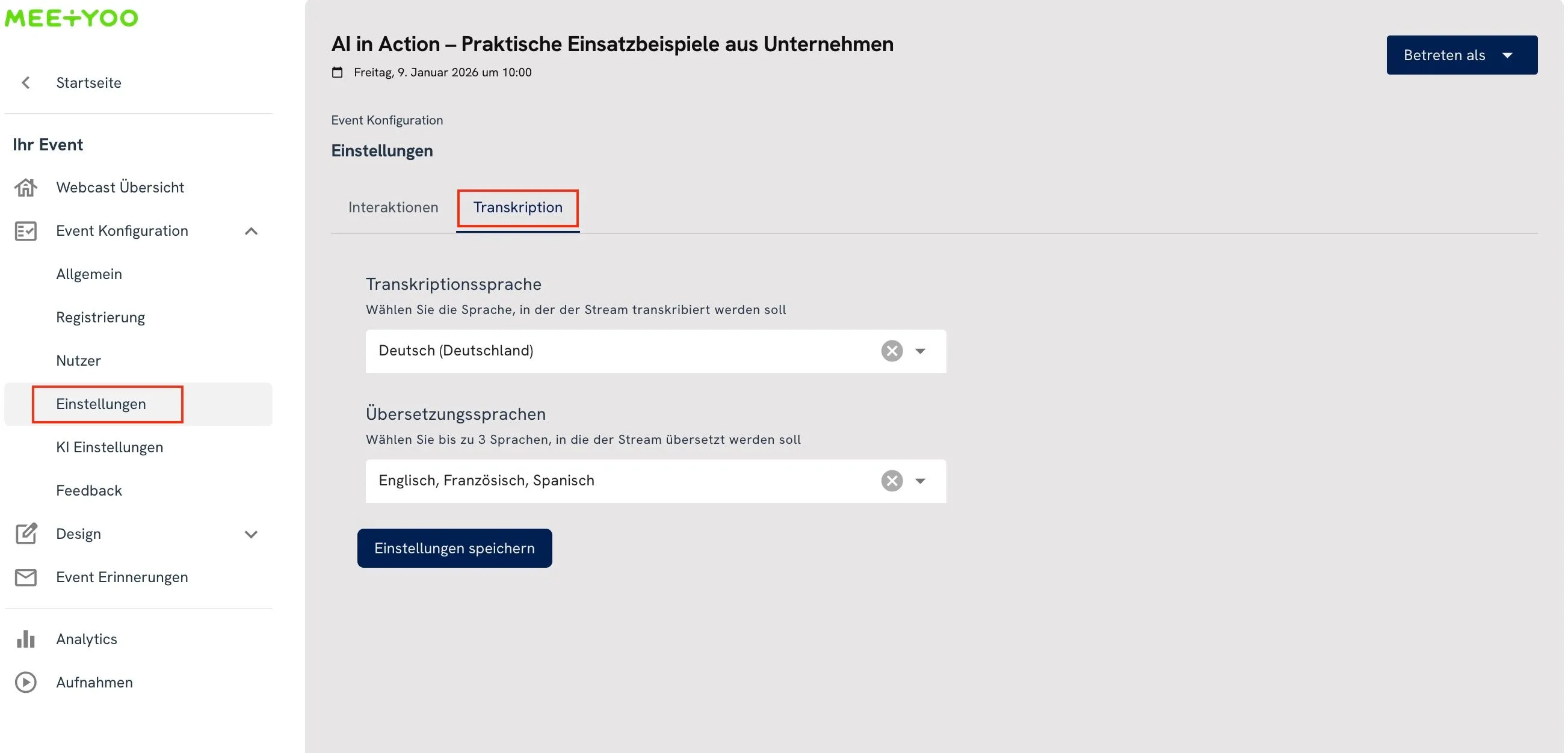
MEETYOO Show offers live subtitles in the original language or as a translation. You set the languages in the event settings (Transcription tab), and participants switch on the language they want in the player. Ask speakers to stay with the defined main language, and tell the audience that the subtitles are generated automatically. The individual steps are described in the article Making webcasts accessible.
We have compared how accurate live transcription is in a stress test: Live Transcription Stress Test: AWS vs. Google. For a German technical presentation, the best system tested had a word error rate of 11.7 percent. Automatic subtitles therefore contain errors.
Process: from planning to follow-up
| Phase | What to do |
|---|---|
| Preparation | Assign roles, clarify data protection documents, set subtitle languages |
| Test room | Create the event and go through the settings. At CERES, the first test room was open within minutes. |
| Rehearsal | Feed the signal from the room, check sound, practice the Q&A round with the co-moderation |
| Live | Alternate room and online moderation, review questions continuously |
| Follow-up | Provide the recording and make it easy to find for your audience |
The steps for your first webcast are in the guide to your first webcast.
Common pitfalls and what helps
| Pitfall | What helps |
|---|---|
| The online audience becomes a passive viewer | Plan questions, polls and Q&A from the start and appoint a dedicated online co-moderator |
| Questions from the room cannot be heard in the stream | Have questions in the room asked through a microphone only |
| Text contributions from the stream are invisible in the room | Have the co-moderator call them up or show them on a second display on site |
| Subtitles derail when a speaker switches language | Set the main language and brief speakers in advance |
| The recording surprises participants | Inform them about the recording and its use in advance |
Interaction: how questions get from the stream into the room
Questions from the online audience are at first visible only to the online audience. For them to reach the room, you need a co-moderator who calls them up, or a second display on site, as the bpb describes.
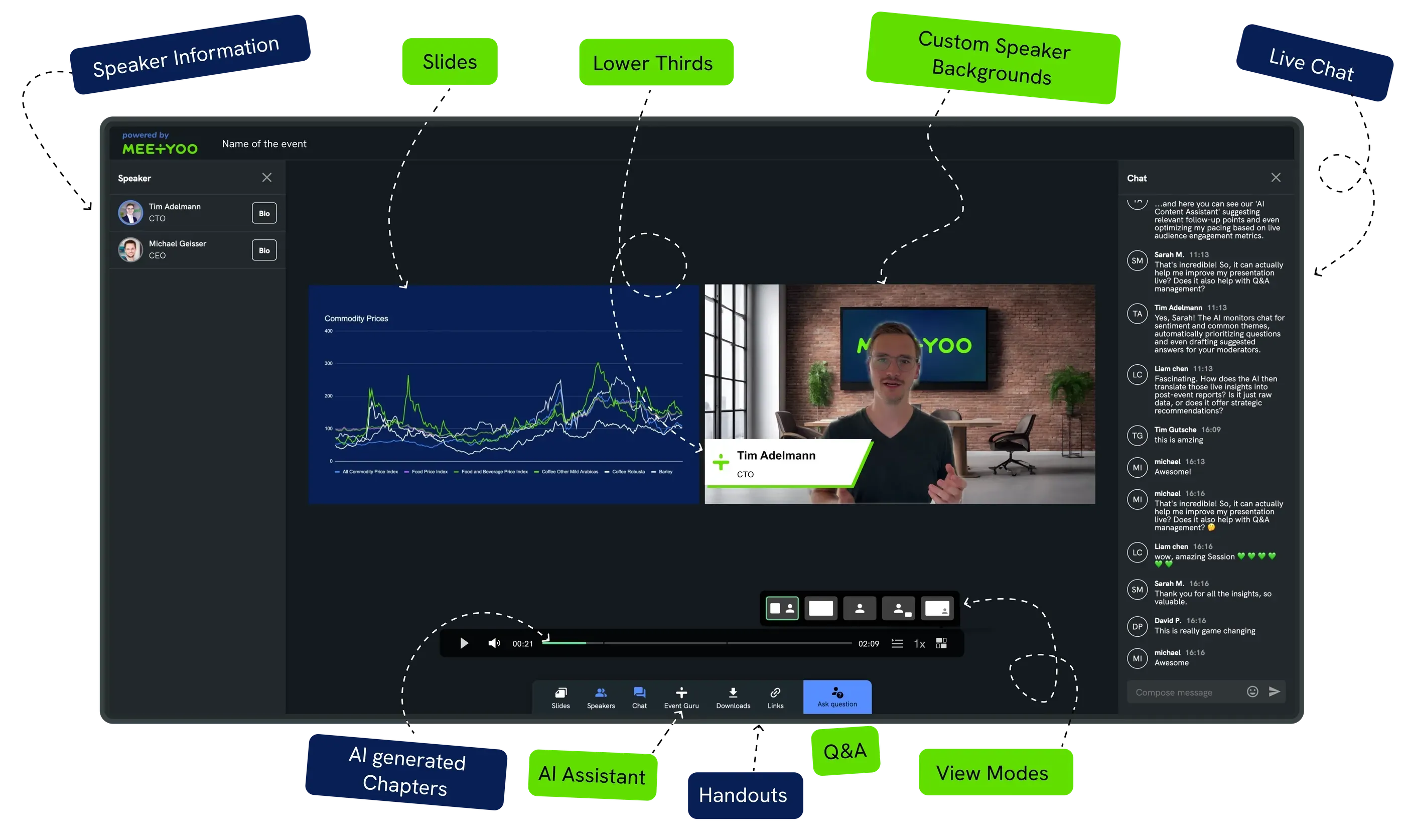
The Q&A in MEETYOO Show provides the tools for this. Moderators decide which questions become visible, and several moderators work in parallel with role-based permissions. Labels such as "Technical" or "Answer Later" organize the questions, you route them to specific speakers, and participants upvote questions. All engagement features are included in every plan, including the permanently free Forever Free plan.
For the CERES research consortium, the question tool was an "enormous added value" for the expert exchange. Public Chat vs. Q&A compares the interaction options, and How to analyse webcast Q&A covers evaluating questions after the event. You will find all engagement features at a glance on the engagement page.
After the conference: the recording as a knowledge archive
After the conference, the expert knowledge exists as a recording. The AI features in MEETYOO Show make it searchable: You get automatic transcripts and chapter markers, and with the optional Chat with Webcast function, the audience asks questions in natural language and receives answers with a timestamp link.
Chat with Webcast is also included in the permanently free Forever Free plan (with usage limits). You will find more in the article The Most Expensive Asset at Every Conference Goes to Waste. All AI features are on the AI features page.
Case in point: the CERES closing conference
CERES research consortium: The project, funded by the BMFTR, ran its closing conference as a hybrid event. Staff without special technical expertise built the digital room in MEETYOO Show themselves, the first test room was open within minutes, and at peak up to 150 people were connected at the same time. Participant feedback was exclusively positive and highlighted the quality and stability of the stream. The full story is in the case study on the CERES hybrid conference.
Self-service or Service on Demand?
For internal events without branding requirements, meeting tools such as Zoom are often enough. If external guests attend, your institution should be visible on the stream or you want to reuse the recording, a platform built for events is worth it. You will find the comparison with Zoom in the article Zoom alternative for webinars.
You run MEETYOO Show in self-service, as CERES did. If more is at stake at your conference, you hand over responsibility with "Service on Demand": An experienced MEETYOO production team takes care of setup, rehearsal, live operation and follow-up. Which model fits is covered in the article managed service or self-service.
Conclusion
Look after the room and the stream separately, clarify data protection before choosing a platform, and give the online audience a way to ask questions. MEETYOO Show brings what you need: operation in self-service, ISO 27001, GDPR, EU servers and a data processing agreement, live subtitles, moderated Q&A and, with Service on Demand, a production team on call. At CERES, a team without special technical expertise operated the platform itself.
Start with a test room in the permanently free Forever Free plan, or talk to us about your conference.
Forever Free plan: permanently free, no expiry date, no credit card required. It includes up to 500 registrations per event, 2 hours of live streaming per month, 10 hours of on-demand content and all engagement tools. Start the Forever Free plan
Planning a conference and want to talk it through with us? Talk to our team. Current plans and prices are on the pricing page.
FAQ
What is a hybrid conference?
A hybrid conference takes place on site, and some participants and speakers join online at the same time. Both groups experience the same program and can take part.
Do I need my own technical team for a hybrid conference?
At CERES, staff without special technical expertise operated MEETYOO Show. Only the video and audio signal from the room came from an external company. How much support you need depends on your room technology.
Which data protection documents do I need?
As a rule, a data processing agreement under Art. 28 GDPR with the platform provider, information for participants under Art. 13 and 14 GDPR, and a notice about the recording. This is not legal advice, so clarify the details with the data protection office of your institution.
Does my live stream need subtitles?
That depends on your organization and state law, so ask the office responsible for accessibility. EU Directive 2016/2102 does not apply to live-streamed media. If the broadcast stays online as a recording, it counts as recorded media from then on (recital 27, guideline of no more than 14 days in principle). MEETYOO Show offers live subtitles in the original language or as a translation.
How do I involve online participants in an on-site conference?
With a co-moderator and a moderated question tool. The co-moderator reviews questions from the stream and brings them to the stage. With the Q&A in MEETYOO Show, you control visibility, labels and assignment to speakers.
What does a hybrid conference with MEETYOO cost?
The Forever Free plan is permanently free, with no expiry date and no credit card, and includes 2 hours of live streaming per month. The Starter plan costs 240 euros per month when billed annually and can also be booked monthly. It includes up to 1,000 registrations per event and 10 hours of live streaming per month. Enterprise is custom.
How quickly can I set up the stream?
At CERES, the first test room was open within minutes. The platform guides you chronologically through the central settings.


