
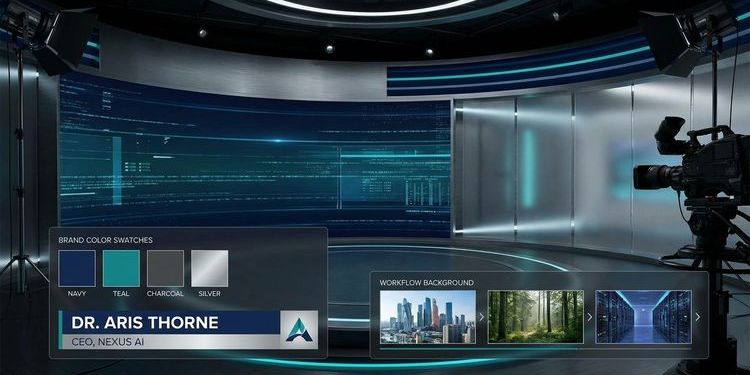
Your webcast content is solid. The speaker is prepared. The agenda is tight. But when the event goes live and attendees see a generic background, a pixelated logo in the corner, and speaker names displayed in default Arial, the professional impression you worked to create dissolves within seconds.
AI event design closes that gap. It gives every event manager and marketing team the tools to build a visually consistent, on-brand webcast experience: from the registration page to the speaker overlay, without a design agency, without days of back-and-forth, and without compromise on quality.
Why visual consistency in webcasts is a business decision
Attendees form an impression in the first few seconds. Inconsistent branding triggers an unconscious signal: "if their event looks this rough, what does their product look like?"
For B2B events, this signal carries real weight. CEO townhalls, investor presentations, and product launches are high-stakes moments. The audience includes prospects, clients, regulators, and journalists. Every visual detail signals whether your organization deserves their attention.
The problem is structural. Most events are assembled under pressure: a PowerPoint from one team, a background image borrowed from a previous event, speaker name cards created the morning of the live stream. No design team has the bandwidth to cover every webcast. The result is visual inconsistency across events and no consistent brand memory.
AI changes the production workflow. What used to require a designer, multiple briefing rounds, and weeks of agency back-and-forth now produces an initial concept in minutes.
The full visual workflow of a professional webcast
A CI-compliant webcast covers six visual layers. Miss one and the experience breaks.
| Visual layer | What attendees see | AI impact |
|---|---|---|
| Registration page | Your brand's first touchpoint | CI-compliant design from branding profile |
| Invitation email | Campaign-level brand presence | Auto-generated in event CI |
| Waiting lobby | First live impression | Background and logo from brand profile |
| Speaker background | Behind every presenter for the full event | AI-generated from text prompt |
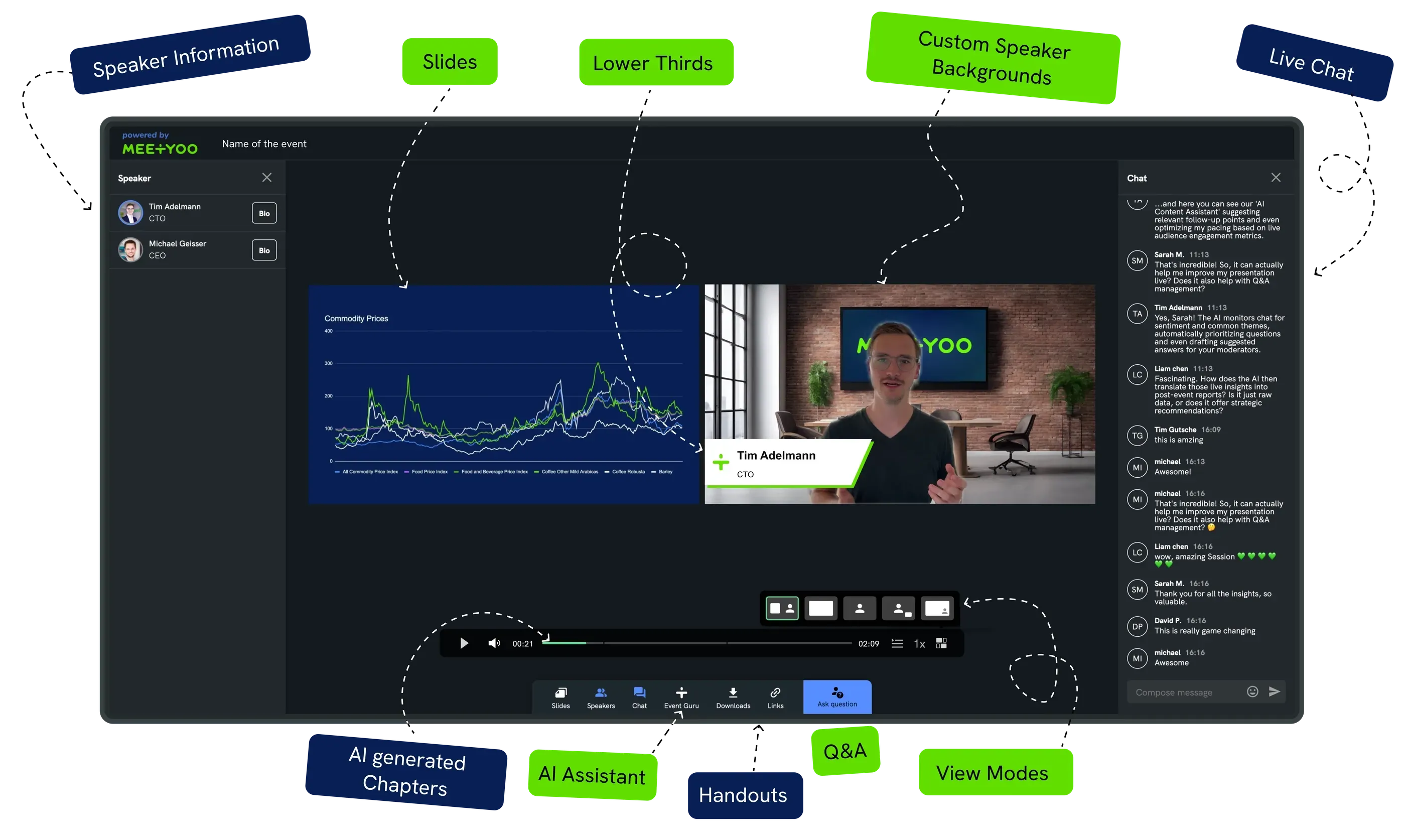
| Lower thirds (overlays) | Name, title, company logo on every speaker | One-click CI templates |
| On-demand archive page | How missed attendees experience the event | Full event branding preserved |
Each layer is a branding opportunity or a branding risk. A generic meeting platform controls none of them. MEETYOO controls all six.
Where AI makes the actual difference in webcast design
1. Mood boards and visual concept in minutes
The classic starting point for any visual project is the mood board: a collection of references that align the team on colors, atmosphere, and design direction. Traditionally, this means hours of searching, collecting, and curating, followed by rounds of stakeholder review before anyone agrees on a direction.
With AI image generation tools (DALL-E, Leonardo.AI, Midjourney, Adobe Firefly) you generate multiple visual concepts from a single text prompt in under a minute. Your team reacts to actual visuals and reaches a direction in the same meeting.
One feature worth knowing: tools like Leonardo.AI can also enhance your prompt automatically. A simple input like "corporate webcast, dark blue tones" gets expanded into a richly detailed prompt with specifications for lighting, texture, depth, and atmosphere. You get professional-quality output even without prompt engineering expertise.
A useful starting template for webcast event visuals:
Prompt template: "Create an eye-catching STYLE visual for a TOPIC event targeting AUDIENCE, using COLORS, featuring KEY VISUAL ELEMENT that captures the event's tone and appeals to the audience."
Example: "Create an eye-catching minimalist visual for a cybersecurity webcast targeting IT decision-makers, using dark navy and electric blue, featuring geometric network patterns that capture precision and trust."
Once you have a direction, share it with stakeholders before committing to a full design. AI-generated concepts are fast enough to iterate in real time during a briefing call, which compresses a direction decision from days to minutes.
MEETYOO tip: You don't need external tools for your webcast backgrounds. MEETYOO Show's built-in AI background generator creates event-specific backgrounds directly from your text description, already optimized for 16:9 speaker framing.
2. Event theme generation: from URL to full CI
For organizations with established brand guidelines, MEETYOO's AI branding builder takes a different route. You enter your website URL. The AI analyzes your corporate colors, logo usage, and visual language, then generates a complete event theme in seconds.
No manually entering hex codes. No opening the brand guidelines PDF. No waiting for the design team.
For teams running recurring events, quarterly earnings calls, monthly product webinars, onboarding sessions, this means consistent branding across every event without additional setup time per event.
3. Speaker backgrounds: AI-generated, CI-matched
The most common visual breakdown point in webcasts is the speaker background. Even when the registration page and lobby look polished, a speaker joining with a cluttered home-office bookshelf or a blurry video conferencing background destroys the professional impression instantly.
MEETYOO's AI background generator solves this for every speaker on your roster, not just the main presenter. Speakers describe their background in plain text. The AI generates a professional, event-matched virtual background, optimized for speaker visibility, depth of field, and brand alignment.
For a tech conference, that might be:
"Futuristic digital background, dark blue gradient, subtle geometric patterns, soft diffused light, no people, f/1.8, professional studio look"
For an executive townhall:
"Modern minimalist office, glass walls, soft natural window light from the left, corporate atmosphere, cool tones, depth of field"
Each background keeps the speaker in focus, avoids visual competition, and signals that someone thought about this event before it went live.
Deep-dive guide: Virtual speaker backgrounds with AI
4. Lower thirds: from design file to live overlay in seconds
Lower thirds are the name-and-title overlays that appear at the bottom of a speaker's video frame. In broadcast television, they signal authority instantly: "Dr. Maria Schmidt, Head of AI Research" gives every late attendee immediate context.
In webcasts, lower thirds serve the same function. But most teams either skip them entirely or create static image files in PowerPoint: hours of manual prep work, inconsistent results across speakers.
MEETYOO's Lower Thirds Creator changes this workflow completely. You select a template, fill in name, title, and optional logo, apply your brand colors with one click, and the lower third is ready for live activation. During the live stream, the operator activates and deactivates each overlay in real time. For events with guest speakers or partner companies, partner logos upload separately and integrate cleanly next to the speaker name, no designer required.
Full guide: lower thirds for webcasts
Building the complete visual package: a practical workflow
Here is how a well-organized event team builds the full visual package for a professional webcast in MEETYOO Show.
Step 1: Define the visual direction (15 minutes)
Use an AI image tool (or MEETYOO's built-in generator) to develop 3 to 5 background concepts from a text prompt. Pick the direction. Note the key visual parameters: color palette, atmosphere, lighting style. Share the concepts with your team or client for a fast alignment round before moving forward.
Step 2: Run the AI branding builder (5 minutes)
Enter your website URL in MEETYOO Show. The AI generates your event theme: colors, logo placement, background for the lobby and on-demand page. Adopt or adjust.
Step 3: Generate speaker backgrounds (10 minutes per speaker, or bulk via prompt template)
Use the visual parameters from Step 1 to generate backgrounds for all speakers. A shared prompt template ensures consistency across the full speaker lineup.
Step 4: Create lower thirds (20 minutes for a full cast)
In the Lower Thirds Creator, fill name, title, and logo for each speaker. Brand colors apply automatically from the event theme. Assign lower thirds to speakers before the dry run.
Step 5: Run a tech rehearsal
Test backgrounds, lower third timing, and outfit-to-background color contrast. The tech rehearsal is where visual problems surface before they matter live.
Step 6: Go live and preserve the brand on-demand
MEETYOO stores the recording with the full event branding intact. The on-demand page attendees receive carries the same professional look and feel.
Total time investment: A complete visual package for a five-speaker webcast, including event theme, speaker backgrounds, and lower thirds, takes roughly two to three hours with AI. Without AI, the same work typically takes two to three days and a dedicated designer.
MEETYOO vs. generic tools: the visual gap
| Capability | Zoom / Teams | Generic webinar tools | MEETYOO Show |
|---|---|---|---|
| AI event theme from URL | No | No | Yes |
| AI background generator | No | No | Yes, built-in |
| Lower thirds creator | No | Manual file upload | CI templates, one-click |
| Sub-branding per event | No | Limited | Full, per event |
| On-demand page in brand design | No | No | Automatic |
| Mood board workflow | External tools only | External tools only | Built into design workflow |
Zoom and Teams were built for daily meetings. They give you a logo upload and a virtual background. They don't give you a visual production workflow. The difference becomes visible in every high-stakes event: a CEO townhall that looks like a video call sends the wrong signal.
Organizations like Commerzbank, Allianz GI, and Merck rely on MEETYOO Show for exactly these events.
Full guide: CI-compliant webcast branding with MEETYOO
Use cases: who benefits most from AI event design
Marketing teams running lead-gen webinars
Each webinar is a brand touchpoint. Attendees compare your event quality with competitors who run polished, branded productions. AI event design closes that gap without scaling the design team.
Internal communications teams
CEO townhalls and all-hands meetings with professional branding signal that a message carries executive authority. Consistent lower thirds and a polished event theme increase attendee attention and message retention.
Investor relations and financial communications
Earnings calls and analyst presentations are watched for signals. Visual quality is one of them. A consistently branded IR webcast signals organizational discipline to the people who matter most.
Event agencies and AV studios
Clients expect polished results. With MEETYOO's AI design tools, agencies deliver a full visual package per event in hours rather than days, with full client branding applied automatically.
Step-by-step: background and overlay setup in MEETYOO Show
If you want to apply this workflow right now, the webcast design setup guide walks you through every step in MEETYOO Show, from navigating to Speaker Customization to activating overlays live during a stream.
The key steps:
- Go to Event Configuration > Design > Speaker Customization
- Under Backgrounds: upload a custom image or click Generate Background for the AI generator
- Under Lower Thirds: click + Add Overlay, fill in the fields, upload your logo
- During the live event: activate backgrounds and lower thirds from the toolbar with one click
All elements activate and deactivate in real time. No live production experience required.
FAQ
Which AI tools work best for generating webcast visuals?
DALL-E, Leonardo.AI, Midjourney, and Adobe Firefly all produce professional-quality event visuals from text prompts. Leonardo.AI stands out for its prompt enhancement feature: it takes a simple description and automatically expands it into a detailed, optimized prompt. For webcast backgrounds specifically, MEETYOO Show has a built-in AI generator that produces results already sized and optimized for speaker framing.
What are the best AI tools for webcast branding?
For building a complete branded webcast experience, MEETYOO Show is the most direct option: the AI branding builder generates a full event theme from your website URL in seconds, and the built-in AI background generator creates speaker backgrounds without leaving the platform. External tools like DALL-E or Midjourney work well for mood boards and concept visuals, but require an extra step to import into your event setup. For teams who want everything in one place, MEETYOO covers the full branding workflow.
Can I use external AI image tools and then import designs into MEETYOO?
Yes. You can upload any 16:9 image as a speaker background. For lower thirds, upload a 16:9 PNG with a transparent background outside the overlay area. MEETYOO also has an AI background generator built in, so external tools are optional.
Does the AI background generator work for all speakers, or just the main presenter?
It works for every speaker. Each speaker activates their own background individually in the webcast room. Admins can also prepare and assign backgrounds centrally from the event configuration.
How long does it take to build a complete visual package?
For a standard five-speaker webcast: two to three hours with AI tools. The most time-intensive step is typically the lower thirds review before the dry run.
Do I need a design team to run CI-compliant webcasts with MEETYOO?
No. The AI branding builder generates your event theme from a URL. The Lower Thirds Creator applies your brand colors automatically. The AI background generator creates speaker backgrounds from text prompts. These tools are built for event managers.
What happens to the branding in the on-demand recording?
The full event branding is preserved in the recording and on the on-demand archive page. Attendees who view the recording after the live event experience the same professional visual quality.
Is the AI image generation GDPR-compliant?
Yes. All AI processing in MEETYOO runs on EU servers, ISO 27001-certified and GDPR-compliant. No data leaves the European infrastructure.
Which MEETYOO plan includes the AI design features?
All plans include event theming and the AI background generator with usage limits. Lower thirds are available on all plans. The Forever Free plan supports up to 500 registrations per event and 2 hours of live streaming per month, no credit card, no expiry date.


