
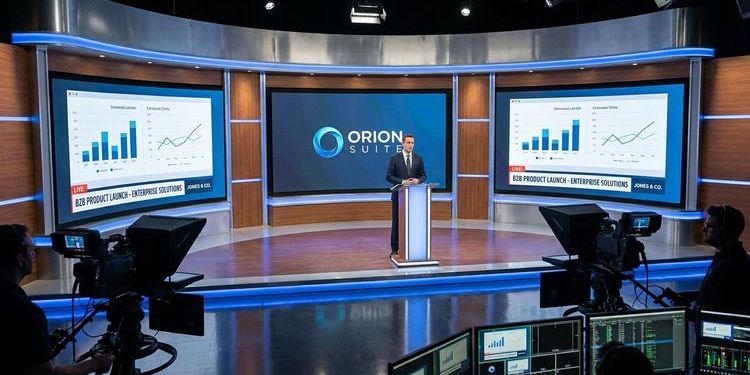
A product launch webcast carries more weight than any other digital format your marketing team produces. Months of development work, positioning discussions and marketing preparation condense into a single live window. Customers, partners, press and sales all watch at the same time.
Yet many of these launches run on the same tools as an internal status meeting: pixelated stream, generic interface without brand identity, Q&A in chaos, recording sitting in a folder three days later.
This guide shows you how a professional B2B product launch as a webcast is structured: from strategy through setup to follow-up that turns event interest into real pipeline.
MEETYOO Show is browser-based, no download required. Create a free account today and set up your first event. Forever Free Plan — start free, no credit card required. Start for free →
Why a product launch is the most demanding webcast format
An all-hands meeting can be a little rough around the edges. A training session can be edited afterwards. A product launch cannot.
The demands placed on this single event are unique:
Multiple audiences, one event. Existing customers want to know whether the new feature solves their problem. Prospects are evaluating whether a demo call is worth their time. Sales needs messaging they can use immediately. Partners are watching to see how they can resell the product. All of this happens at the same time, in the same stream.
No room for technical failure. A dropped stream during a town hall is embarrassing. At a product launch in front of press contacts and potential enterprise customers, it is a reputational setback that lingers for months.
Weeks of preparation, 45 to 60 minutes to deliver. You have a single live window to build tension, present the product, answer questions and place a clear call to action. After that, your follow-up determines whether interest becomes pipeline.
An honest question: Is your current webcast platform built for this moment, or for the next status call?
The three most common mistakes in virtual product launches
Mistake 1: No visual difference from a normal video call. You give your product a big moment and present it on the same interface where yesterday's sprint review took place. Without custom branding, without overlays, without CI-compliant design, the event signals: this is nothing special. Your audience registers that, consciously or not.
Mistake 2: Going fully live. Live events create urgency and drive registrations. But they are high-risk productions. Speaker dropout, internet issues, technical failures: painful for a normal webinar, potentially reputation-damaging for a virtual product launch in front of 500 people. Many teams know the risk and take it on anyway.
Mistake 3: The event ends with the stream. The recording goes out as a link, the slides land in a Drive folder, and a large portion of the generated interest evaporates. Event leads go cold quickly when no substantive follow-up arrives. A generic email with the recording link does not count as substantive follow-up.
The right strategy: A product launch in three phases
Anyone planning a virtual product launch needs a communication campaign in three defined phases. The webcast is its centrepiece.
Phase 1: Pre-launch
The quality of your registrations depends heavily on what you do in the two to three weeks before the event. The goal is not just a high registration number, but getting the right people into your funnel at the right time.
Teaser communication. Rather than revealing the full feature scope immediately, build tension gradually: "We're solving a problem your sales team has been talking about for two years." The launch webcast becomes the place where the answer is revealed.
Segmented invitations. Existing customers, prospects and internal teams are interested in different aspects of the same product. Three short, persona-specific invitation variants typically achieve better open and registration rates than one version for everyone.
Registration as a qualification point. Anyone who registers is showing interest. Use the registration form to capture one or two qualifying fields, for example company size or the solution currently in use. Your sales team can work with that data immediately after the event.
→ A complete communication plan with email templates is available here: Webcast email templates & timeline
Phase 2: Launch day
Two things need to work simultaneously: technical reliability and visual professionalism.
Pseudo-live: The smartest decision you can make for your launch
Most event teams face a binary choice. Either they go fully live, with all the associated risk. Or they produce a recording that, as on-demand content, generates no urgency and attracts fewer attendees as a result.
MEETYOO Show offers a third option: Pseudo-Live.
You produce your launch stream in advance at perfect quality. At the scheduled start time, attendees see a countdown, just like a real live event. The session starts at exactly the announced time, synchronised for everyone. The experience feels like a premiere. The risk is that of a recording: none.
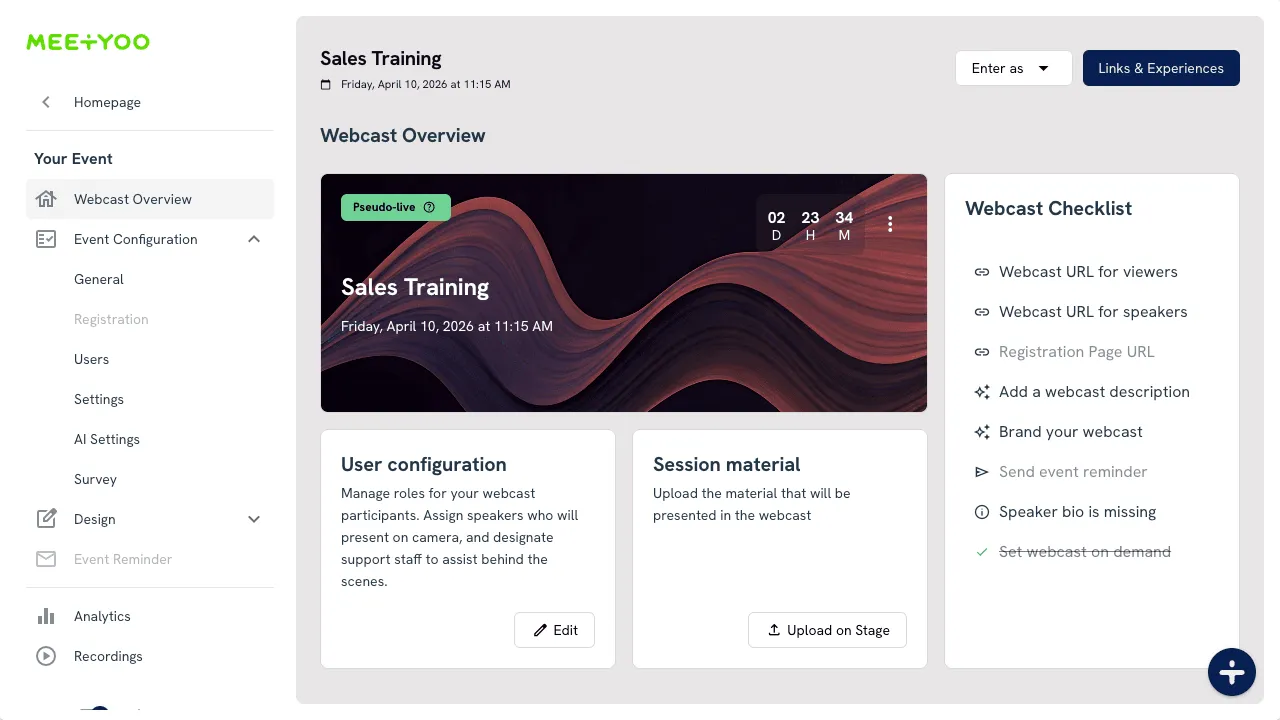
After the launch, the event automatically opens for on-demand access at a time you set in advance. VIP attendees see the launch at the premiere; everyone else watches on demand afterwards.
→ Full setup guide: Pseudo-Live: The smart way to launch events
Your next launch without live risk. Set up Pseudo-Live directly in your free MEETYOO account. Forever Free Plan — start free, no download, no credit card. Start for free →
Pro tip: Schedule a live Q&A session directly after your Pseudo-Live stream. This combines the reliability of a pre-produced presentation with real-time interaction — the best of both worlds.
Branding: Your product deserves its own stage
CI-compliant design is part of your product positioning. An event that is visually indistinguishable from your brand communicates professionalism before the first slide appears.
MEETYOO Show gives you full CI customisation: colours, logos, backgrounds, overlays, all matching your product's brand identity. With the AI Branding Builder, you enter the URL of your product page and MEETYOO automatically generates a matching event design.
Lower thirds identify your speakers professionally, like on TV. The detail that stays in the memory when hundreds of people are watching your stream.
→ How to set up backgrounds and overlays: Webcast design guide
→ Lower thirds step by step: Creating lower thirds for webcasts
Interaction: Turning viewers into participants
Live polls let you qualify early: "Which problem from our roadmap is most urgent for you?" The answers are immediately actionable intelligence for your sales team.
Q&A with AI labelling ensures that no relevant question gets lost in a large session. Questions are automatically categorised, for example by "Pricing", "Technical" or "Use Case". Your moderation team immediately sees what needs to be prioritised.
→ More on interaction formats: How to make your webcast interactive: 6 strategies
Phase 3: Post-launch
The launch webcast is the densest content asset your marketing team produces: 45 to 60 minutes of original product messaging, genuine questions from your target audience, documented interest through registration and attendance.
Many marketing teams send out the recording link, write a short email and move on to the next event. That is understandable, but it comes at a cost: the majority of interested parties receive no message tailored to their level of engagement.
Those who get more out of the event do three things:
Segmented follow-up within 24 hours. Send different messages: one for attendees, one for no-shows, one for people who registered but did not appear. Each group has a different level of information and a different readiness to buy.
Q&A analysis as sales intelligence. Which questions were asked most frequently? Which ones show concrete purchase intent? Which are objections your sales team needs to know and counter? The Q&A session from your launch webcast is a dataset your sales team can use directly.
→ How to analyse Q&A data strategically: How to analyse webcast Q&A: Turn audience questions into strategy
AI-powered content repurposing. MEETYOO Show automatically generates chapter markers for the navigable on-demand recording, an AI summary and key-moments highlights after the event. Manually processing a 60-minute webcast without tool support takes an experienced team a full working day. With MEETYOO, this becomes standard output after every event.
→ Why your recording is your most important post-launch asset: After the webinar ends: why your recording is your most wasted asset
→ How AI multiplies your content ROI: More than just a transcript: How AI really maximises your webcast ROI
What MEETYOO Show automatically generates after every launch: 1 navigable on-demand session with chapter markers, 1 AI summary, highlight clips for social media, AI-drafted follow-up emails, 1 categorised Q&A document for sales.
Timeline: How to prepare your product launch webcast
4 weeks before the launch
- Create the event in MEETYOO Show, set up the registration page with CI branding
- Plan the invitation campaign, segmented by persona
- Decide on the event format: live, pseudo-live or hybrid
2 weeks before the launch
- Speaker briefing and rehearsal
- Set up branding elements: backgrounds, lower thirds, overlays
- Prepare polls, assign Q&A moderation roles
- For pseudo-live: produce and upload the recording
1 week before the launch
- Activate the reminder email sequence
- Technical dry run with full setup
- Draft follow-up communication for all three segments
Launch day
- 30 minutes before start: final technical check
- Countdown runs
- Stream and Q&A session
- Send first follow-up email to attendees immediately after the session ends
48 hours after the launch
- Review AI-generated chapters and summary
- Release the on-demand recording
- Hand over the Q&A export to sales
- Activate the segmented follow-up sequence
MEETYOO Show for product launches: What this means in practice
| Problem | MEETYOO solution |
|---|---|
| Technical failure live in front of a large audience | Pseudo-Live: pre-produced, on time, zero live risk |
| Generic visuals with no brand identity | AI Branding Builder, CI-compliant overlays and lower thirds |
| Q&A chaos with 300+ attendees | Q&A with AI labelling and moderation prioritisation |
| Recording goes unused after the event | Automatic chapters, key moments, AI summary |
| No lead qualification through the event | Live polls and engagement data for sales |
| Global teams across different time zones | Pseudo-Live for multiple regions with identical content |
Commerzbank, Mercedes-Benz, Allianz GI, L'Oréal, Merck, Siemens, SAP and AutoScout24 use MEETYOO Show for exactly these moments.
All AI features. Forever Free Plan. No credit card. Pseudo-Live, AI branding, Q&A labelling and automatic chapters: all available from the first day of your free account. Create account now →
Checklist: Your product launch as a webcast
Strategy and setup
- Target audience defined, invitation segmented
- Event format decided: live, pseudo-live or hybrid
- Registration page set up with CI branding
- Communication plan with reminder sequence in place
Production and branding
- Speaker briefing completed
- Backgrounds, overlays and lower thirds set up
- Polls prepared, Q&A roles assigned
- Rehearsal completed
- For pseudo-live: recording uploaded and activated
Post-launch
- Segmented follow-up emails prepared for all three segments
- Q&A export prepared for sales
- On-demand availability configured
- AI-generated assets reviewed: chapters, summary, highlights
Ready to get started? Create your free MEETYOO account and set up your first launch event. All AI features, Forever Free Plan, no credit card. Start for free →
Conclusion
MEETYOO Show gives you technical reliability through Pseudo-Live, visual quality through CI-compliant branding and automated content repurposing that keeps working after the stream ends. Browser-based, ready to use immediately, Forever Free Plan — start free, no credit card.
Create your free account now →
Prefer a quick look at the platform first? Book a demo →
FAQ
What is the difference between a regular webinar and a product launch webcast?
A webinar shares knowledge. A product launch webcast drives a purchase decision. The requirements for reliability, branding, interaction and follow-up are higher because the audience consists of customers, prospects and partner companies all watching at the same time.
Is pseudo-live suitable for small teams too?
Yes, it is ideal for small teams in particular. You produce once at your own pace, without the stress of going live, and still deliver the attendee experience of a live event complete with countdown and synchronised start. No production team, no backup setup required. Pseudo-Live is included in all MEETYOO Show plans, including the Forever Free Plan. Start free →
How early should you start preparing the webcast before the launch?
At least four weeks: two for building the registration page and communication plan, two for production, branding and technical checks. Anyone working to a tighter schedule risks either low registration numbers or a technically improvised delivery. If your launch is less than four weeks away, create your account today and use the first few days for setup. Create account →
Can MEETYOO Show broadcast the product launch to multiple regions?
Yes. With Pseudo-Live you can premiere the same recording at optimal times for different regions as separate events. EMEA at 10am CET, APAC in the evening local time. The same product messaging, timed for each region.
How do I manage a large Q&A session with 300 or more attendees?
MEETYOO Show's AI labelling automatically categorises incoming questions by topic and priority. Multiple moderators can work simultaneously, assign questions to specific speakers and hide irrelevant ones.
What happens to the launch webcast after the event?
MEETYOO Show automatically generates chapter markers, an AI summary and key-moments highlights. The recording becomes a navigable on-demand session. Your sales team uses it in customer conversations; your marketing team uses it as a permanent asset.
Do I need an enterprise plan for a product launch?
No. All AI features are fully available in the Forever Free Plan — permanently free, no credit card required. You can plan, run and evaluate your launch before thinking about a paid plan. Start free →


